SLOs and error budgets: alerting on what matters
Contents
This is part 6 of the Production Observability series. In part 5 we built dashboards. Before we wire up alerts in part 7, we need to answer a harder question: what should we alert on?
The answer is SLOs. This post explains the framework before we implement alerts.
The problem with threshold alerts
The typical alert setup: pick a metric, pick a threshold, alert when the metric exceeds the threshold.
- Error rate > 1% → alert
- Latency p99 > 500ms → alert
- CPU > 80% → alert
This works, until it does not. After a few months you have dozens of alerts. Some fire constantly on thresholds that turned out to be too tight. Others have thresholds set so loosely they never fire even during incidents. On-call engineers start ignoring alerts because most of them are noise. Alert fatigue sets in and real incidents get missed.
The fundamental problem: threshold alerts have no connection to user impact. A 1% error rate at 10 requests per minute is 0.1 errors per minute. A 1% error rate at 100,000 requests per minute is 1,000 errors per minute. Same threshold, wildly different impact. A threshold that is appropriate during low traffic is too tight during high traffic, and vice versa.
SLOs solve this by grounding alerts in a defined reliability target and its depletion rate.
SLI, SLO, error budget
Three definitions:
Service Level Indicator (SLI) — a specific measurement of service behaviour. For availability: the fraction of valid requests that succeed. For latency: the fraction of requests that complete in under some threshold.
Service Level Objective (SLO) — a target value for an SLI over a rolling window. “99.9% of requests succeed over a 30-day rolling window.”
Error budget — the amount of unreliability the SLO permits. An SLO of 99.9% over 30 days means 0.1% of requests can fail. That 0.1% is the error budget.
The error budget makes reliability concrete: you have a finite allowance of failures per month. When you are burning through it slowly, you have headroom to deploy new features. When you are burning through it fast, you stop feature work and fix reliability.
Service Level Agreement (SLA) — a contract with a customer, usually with financial consequences if the target is missed: credits, refunds, contract penalties. An SLO is internal; an SLA is external.
The standard practice is to set SLOs stricter than SLAs. If your SLA commits to 99.9% availability and your internal SLO is also 99.9%, a single incident that tips you over the line simultaneously breaches the customer contract. Teams typically run internal SLOs at 99.95% or 99.99% so alerts fire — and there is time to recover — before the SLA window closes. When your on-call engineer gets paged at 2am, the relevant number is the SLO. The SLA is what your sales and legal teams care about.
The nines
Availability SLOs are often stated in “nines”:
| SLO | Downtime budget per 30 days | Errors per million requests |
|---|---|---|
| 99% (two nines) | ~7.2 hours | 10,000 |
| 99.9% (three nines) | ~43 minutes | 1,000 |
| 99.95% | ~21 minutes | 500 |
| 99.99% (four nines) | ~4.3 minutes | 100 |
For the order service, 99.9% availability is a reasonable starting target. It means we can have 43 minutes of complete outage, or a sustained 5% error rate for about 14 hours, before we have exhausted the monthly error budget.
Defining SLIs for the order service
Availability SLI: the fraction of POST /orders, GET /orders, and GET /orders/{id} requests that return a non-5xx response.
In Prometheus terms:
# SLI: fraction of successful requests
1 - (
  sum(rate(http_requests_total{job="order-service", status=~"5.."}[5m]))
  /
  sum(rate(http_requests_total{job="order-service"}[5m]))
)
Latency SLI: the fraction of requests that complete in under 500ms.
# Fraction of requests completing under 500ms
sum(rate(http_request_duration_seconds_bucket{
  job="order-service", le="0.5"
}[5m]))
/
sum(rate(http_request_duration_seconds_count{job="order-service"}[5m]))
For this to work accurately, 0.5 must be one of your histogram bucket boundaries. Check prometheus/rules/recording.yml — if 0.5 is not in the bucket list, add it.
Error budget recording rules
Record the SLI as a time series so you can track it over time and use it in both dashboards and alert rules.
prometheus/rules/recording.yml additions:
  - name: slo
    interval: 60s
    rules:
      # Availability SLI: 5-minute window (for fast alerts)
      - record: job:slo_availability:ratio_rate5m
        expr: |
          1 - (
            sum(rate(http_requests_total{job="order-service", status=~"5.."}[5m]))
            /
            sum(rate(http_requests_total{job="order-service"}[5m]))
          )

      # Availability SLI: 30-minute window (for medium burn detection)
      - record: job:slo_availability:ratio_rate30m
        expr: |
          1 - (
            sum(rate(http_requests_total{job="order-service", status=~"5.."}[30m]))
            /
            sum(rate(http_requests_total{job="order-service"}[30m]))
          )

      # Availability SLI: 1-hour window
      - record: job:slo_availability:ratio_rate1h
        expr: |
          1 - (
            sum(rate(http_requests_total{job="order-service", status=~"5.."}[1h]))
            /
            sum(rate(http_requests_total{job="order-service"}[1h]))
          )

      # Availability SLI: 6-hour window
      - record: job:slo_availability:ratio_rate6h
        expr: |
          1 - (
            sum(rate(http_requests_total{job="order-service", status=~"5.."}[6h]))
            /
            sum(rate(http_requests_total{job="order-service"}[6h]))
          )

      # Availability SLI: 3-day window (for slow burn detection)
      - record: job:slo_availability:ratio_rate3d
        expr: |
          1 - (
            sum(rate(http_requests_total{job="order-service", status=~"5.."}[3d]))
            /
            sum(rate(http_requests_total{job="order-service"}[3d]))
          )
The reason we compute the SLI over multiple windows becomes clear in the next section.
Multi-window, multi-burn-rate alerts
A single alert threshold misses two important cases:
- A fast, severe outage that depletes a large fraction of the error budget in minutes
- A slow, subtle degradation that depletes the error budget over days — never triggering a threshold alert but silently exhausting reliability
Multi-window, multi-burn-rate alerting addresses both.
The concept: instead of alerting when the error rate exceeds a static threshold, alert when the burn rate exceeds what is sustainable for the SLO.
For a 99.9% SLO (0.1% error budget), the sustainable burn rate is 1×. At 1× burn rate, the error budget is exactly exhausted at the end of the 30-day window. At 14.4× burn rate, the monthly budget is exhausted in 2 hours.
The alert levels
Google’s SRE Workbook (Chapter 5) defines four alert levels for a 30-day SLO window:
| Level | Burn rate | Budget consumed | Short window | Long window | Action |
|---|---|---|---|---|---|
| 1 | 14.4× | 2% in 1h | 5m | 1h | Page immediately |
| 2 | 6× | 5% in 6h | 30m | 6h | Page immediately |
| 3 | 3× | 10% in 3d | 6h | 3d | Open ticket |
| 4 | 1× | 100% in 30d | 6h | 3d | Open ticket |
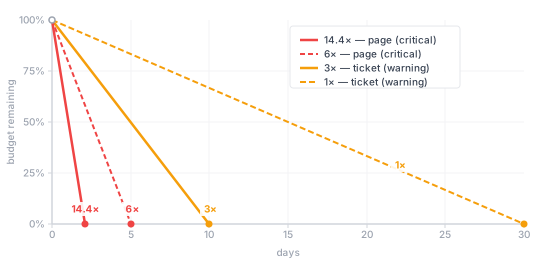
Level 1 is the paging alert. The service is burning budget fast enough that, left unchecked, it will be exhausted within hours. Level 4 is the silent killer — no single window looks alarming, but at the end of the month the budget is gone. Without a slow-burn alert, you discover this when it matters most: at the start of a release week.
# Level 1: 14.4× burn — pages immediately
- alert: ErrorBudgetBurnFast
  expr: |
    job:slo_availability:ratio_rate5m < (1 - 14.4 * 0.001)
    and
    job:slo_availability:ratio_rate1h < (1 - 14.4 * 0.001)
  for: 2m
  labels:
    severity: critical
    slo: availability
  annotations:
    summary: "Fast error budget burn on order-service"
    description: |
      Availability SLI is .
      At this rate, the monthly error budget will be exhausted in ~2 hours.
    runbook: "https://github.com/mguarinos/observability-demo/wiki/runbooks/error-budget-burn"

# Level 2: 6× burn — pages immediately
- alert: ErrorBudgetBurnMedium
  expr: |
    job:slo_availability:ratio_rate30m < (1 - 6 * 0.001)
    and
    job:slo_availability:ratio_rate6h < (1 - 6 * 0.001)
  for: 15m
  labels:
    severity: critical
    slo: availability
  annotations:
    summary: "Sustained error budget burn on order-service"
    description: |
      Availability SLI is  over 6h.
      At this rate, the monthly error budget will be exhausted in ~5 days.
    runbook: "https://github.com/mguarinos/observability-demo/wiki/runbooks/error-budget-burn"

# Level 3: 3× burn — ticket, no page
- alert: ErrorBudgetBurnSlow
  expr: |
    job:slo_availability:ratio_rate6h < (1 - 3 * 0.001)
    and
    job:slo_availability:ratio_rate3d < (1 - 3 * 0.001)
  for: 1h
  labels:
    severity: warning
    slo: availability
  annotations:
    summary: "Slow error budget burn on order-service"
    description: |
      Availability SLI is  over 3d.
      At this rate, the monthly error budget will be exhausted in ~10 days.
    runbook: "https://github.com/mguarinos/observability-demo/wiki/runbooks/error-budget-burn"

# Level 4: 1× burn — ticket, no page
- alert: ErrorBudgetAtRisk
  expr: |
    job:slo_availability:ratio_rate6h < (1 - 1 * 0.001)
    and
    job:slo_availability:ratio_rate3d < (1 - 1 * 0.001)
  for: 3h
  labels:
    severity: warning
    slo: availability
  annotations:
    summary: "Error budget at risk on order-service"
    description: |
      Availability SLI is  over 3d.
      Budget is being consumed at the edge of the sustainable rate — will exhaust by end of window.
    runbook: "https://github.com/mguarinos/observability-demo/wiki/runbooks/error-budget-burn"
The threshold math: 1 - (burn_rate × error_budget_fraction). For a 99.9% SLO (error budget = 0.001), a 14.4× burn rate threshold is 1 - 14.4 × 0.001 = 0.9856. If the SLI drops below that — more than 1.44% of requests failing — the fast-burn alert fires.
The and clause requires both windows to confirm the condition. A short-window spike can push the 5-minute metric below the threshold without the 1-hour window agreeing. Requiring both reduces false positives while keeping detection fast: the short window catches the onset, the long window confirms it is not a blip.
Error budget policy and deployment frequency
The error budget is only useful if the organization commits to acting on it. The numbers alone do nothing; the policy is what changes behaviour.
Google SRE uses error budgets to guide release decisions. Teams typically define thresholds for action — for example, performing a reliability review when a significant portion of the monthly budget is consumed, and pausing feature deployments if the budget is exhausted until it resets in the next window.
This has a counterintuitive effect on shipping frequency. Teams that deploy multiple times per day often assume that more frequent, smaller deploys are always safer. In practice, each deployment is a risk event — a new version is the most common cause of a sudden error budget spike. When the budget is healthy, the team can absorb that risk. When it is depleted, additional deploys are exactly the wrong thing to do.
The concrete form this takes in practice: rather than relying on engineering judgement about whether a system is “stable enough” to deploy, teams tie release approval to the error budget balance. A service with budget remaining gets the green light. One that has burned through its budget does not ship new features until reliability improves. The effect is that engineers who had previously treated reliability as someone else’s problem start requesting reliability work from their own backlogs, because that is the only path back to being able to ship. The error budget converts a cultural argument into a number with a policy attached.
The practical takeaway: the goal is not to ship as rarely as possible — it is to ship at the rate your reliability allows. An error budget forces that rate to be explicit and data-driven rather than a matter of confidence or habit.
Error budget in Grafana
Add a stat panel to the dashboard showing the remaining error budget for the current calendar month:
{
  "type": "stat",
  "title": "Error Budget Remaining (30d)",
  "targets": [
    {
      "expr": "(1 - (sum(increase(http_requests_total{job=\"order-service\",status=~\"5..\"}[30d])) / sum(increase(http_requests_total{job=\"order-service\"}[30d])))) / 0.001",
      "legendFormat": "Budget Remaining"
    }
  ],
  "fieldConfig": {
    "defaults": {
      "unit": "percentunit",
      "thresholds": {
        "steps": [
          {"color": "red", "value": null},
          {"color": "yellow", "value": 0.25},
          {"color": "green", "value": 0.50}
        ]
      }
    }
  }
}
This panel shows what fraction of the error budget remains. 100% means no errors have occurred. 0% means the budget is exhausted.
What you have now
- A mental model for why threshold alerts fail at scale and how SLOs fix that
- An availability SLI defined in terms of the order service’s HTTP metrics
- Recording rules computing the SLI over multiple time windows
- Multi-window, multi-burn-rate alerts that catch both sudden outages and slow degradation
- An error budget visualization in Grafana
In the next post we implement these alert rules in Prometheus and wire up Alertmanager to route them to Slack, with inhibition rules, silences, and runbook links in annotations.