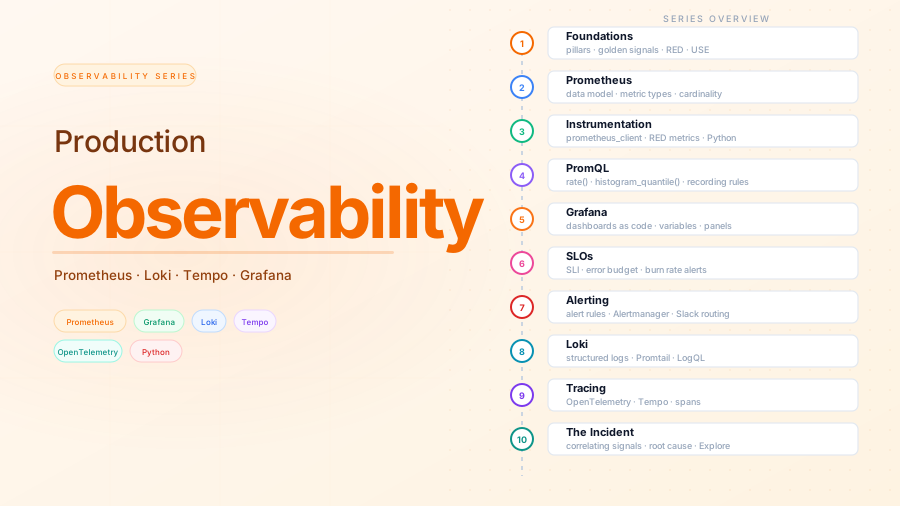
The three pillars, four golden signals, RED and USE
Contents
This is part 1 of the Production Observability series. Before touching any tool, we establish the mental model: what observability is, what the three pillars are, and the frameworks that make metric selection principled rather than arbitrary. Everything built in subsequent posts maps back to ideas introduced here.
The GitHub repository for this series lives at github.com/mguarinos/observability-demo. Each post adds one layer to the stack. By the end you have four fully instrumented Python services with metrics, structured logs, and distributed traces flowing into Grafana, and a practiced incident workflow for correlating them.
Monitoring vs observability
Monitoring is watching known failure modes. You pick metrics in advance, set thresholds, and get alerted when something crosses them. It answers questions you already knew to ask.
Observability is understanding system state from its outputs without requiring you to predict failures in advance. An observable system lets you ask arbitrary questions and get answers. It answers questions you did not know you needed to ask.
The distinction matters because production failures are rarely the ones you anticipated. A system with good monitoring fires the alerts you configured. A system with good observability lets you understand why something is misbehaving, even when you have never seen that failure mode before.
The three pillars
Metrics
A metric is a numeric measurement sampled over time: http_requests_total, memory_bytes_used, order_processing_duration_seconds. Each sample is a number with a timestamp and a set of labels — key-value pairs that describe what was measured.
Metrics are cheap to store, fast to query, and ideal for dashboards, alerts, and anything that needs long-horizon trend data. Their weakness: they do not tell you why something happened. A spike in error rate is a symptom; the metric alone does not tell you which code path caused it.
Logs
A log event is a structured or unstructured text record of something that happened. Each line has a timestamp and a message, optionally with additional fields: user ID, request ID, error message, stack trace.
Logs have high cardinality — they can contain arbitrary values — which makes them excellent for debugging specific incidents. Their weakness: expensive to store and query at scale. A busy service generates gigabytes of logs per day; storing and indexing all of it is not free.
Traces
A trace is a record of a request as it flows through a distributed system. Each step in the journey is a span — a unit of work with a name, start time, duration, and metadata. Spans are linked by a shared trace ID, forming a tree.
Traces answer questions metrics and logs cannot: for this specific request, exactly which services did it touch, in what order, and how long did each step take?
The trade-off: traces require instrumenting every service in the call path, propagating a trace context header between services, and running a trace backend. More infrastructure than metrics or logs, but no substitute when you are chasing cross-service latency.
When to use which signal
| Question | Signal |
|---|---|
| Is the service healthy right now? | Metrics |
| Has the error rate increased in the last hour? | Metrics |
What is the p99 latency for POST /orders? |
Metrics |
| What exactly happened in this specific failed request? | Logs |
| Which downstream service is causing the slowdown? | Traces |
| How long did the database query take for request X? | Traces |
| What was the error message for user Y at 14:32? | Logs |
In practice you chain them. An alert fires (metrics). You open the relevant dashboard, narrow the time window, look at logs for the affected service, find a trace ID, and open the trace to see exactly where time was spent. Post 10 walks through this workflow end to end with a real incident scenario.
The four golden signals
Google’s Site Reliability Engineering book introduced four signals that capture the health of any user-facing service:
| Signal | What it measures |
|---|---|
| Latency | How long requests take — split by success and failure |
| Traffic | How much load the system is handling (requests per second) |
| Errors | Rate of failed requests — explicit 5xx codes, or incorrect responses |
| Saturation | How full the service is — the resource closest to exhaustion |
These four cover the majority of meaningful failure modes. If all four look healthy, the service is almost certainly healthy from the user’s perspective.
A note on latency: track percentiles, not averages. An average can look fine while 1% of users experience 30-second timeouts. p50 is your median user. p95 is your 95th-percentile user. p99 catches your worst 1 in 100. Use histograms so you can compute all three from a single metric.
Saturation is the hardest to measure because the most constrained resource varies by service. For a CPU-bound service it is CPU utilization. For a service waiting on a database it is connection pool exhaustion. For a service generating images it may be GPU memory. There is no universal saturation metric — you have to know what your service is limited by.
RED: a framework for services
RED (Rate, Errors, Duration) was coined by Tom Wilkie at Grafana Labs as a practical shorthand for what to instrument in any request-handling service:
- Rate — requests per second
- Errors — failed requests per second (or error fraction)
- Duration — how long requests take, as a distribution (histogram)
RED maps directly onto three of the four golden signals (Traffic → Rate, Errors → Errors, Latency → Duration). It is intentionally terse: three things to measure first, before anything else. Every service in this series exposes these three from day one.
USE: a framework for resources
USE (Utilization, Saturation, Errors) comes from Brendan Gregg and applies to resources — CPUs, memory, disks, network interfaces, thread pools, connection pools:
- Utilization — the fraction of time the resource is busy (e.g., 70% CPU)
- Saturation — how much work is queued waiting for the resource (e.g., run queue length)
- Errors — error events from the resource (e.g., disk I/O errors, OOM kills)
USE is what you apply to infrastructure and to any shared resource your service depends on. RED tells you the service is slow; USE tells you why, by identifying which resource is saturated.
The demo system
The rest of this series builds observability around a small order-processing system composed of four Python FastAPI microservices. Each service is deliberately simple — no real database, no authentication — so the observability concepts remain in focus.
order-service        POST /orders → orchestrates the full order flow
inventory-service    GET /stock/{item} → checks availability; POST /stock/{item}/reserve
payment-service      POST /charges → processes payment for an order
notification-service POST /notify → sends order confirmation (fire-and-forget)
When a client calls POST /orders on order-service, it fans out to the other three:
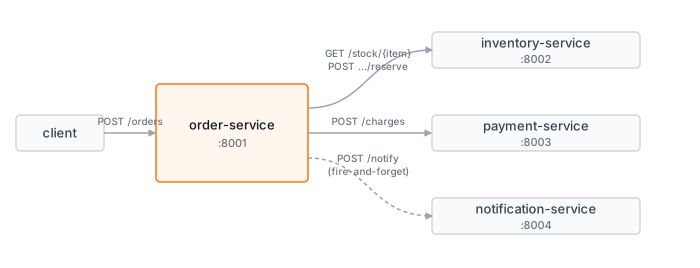
This call graph is intentionally small but real enough to demonstrate every observability concept the series covers. With a single service you could get away without distributed tracing — logs and metrics tell you enough. With four services across separate process boundaries, a trace becomes the only reliable way to know which service is responsible for a given request’s latency.
The system has two planted defects that we will detect and diagnose in later posts:
payment-servicehas a ~5% random failure rate on charge requestsinventory-servicehas a slow path: stock checks for items with high demand (quantity > 5) query a simulated slow lookup, adding 270ms+ to those requests — invisible inorder-servicemetrics but immediately visible in a trace
What the series builds
Each post adds one layer to the same Docker Compose stack:
| Post | Layer added |
|---|---|
| 2 | Prometheus + Node Exporter + cAdvisor — infrastructure metrics |
| 3 | Instrument all four services — RED metrics from Python |
| 4 | PromQL — query what we have, writing queries that mean something |
| 5 | Grafana — dashboards as code, provisioned from files |
| 6 | SLOs — define what “healthy” means with error budgets |
| 7 | Alertmanager — alert routing, Slack integration, inhibition rules |
| 8 | Loki + Promtail — structured logs from all services, correlated by trace ID |
| 9 | Tempo + OpenTelemetry — distributed tracing across service boundaries |
| 10 | Incident walkthrough — correlating all three signals to a cross-service root cause |