<?xml version="1.0" encoding="utf-8"?><feed xmlns="http://www.w3.org/2005/Atom" ><generator uri="https://jekyllrb.com/" version="4.4.1">Jekyll</generator><link href="https://mguarinos.com/feed.xml" rel="self" type="application/atom+xml" /><link href="https://mguarinos.com/" rel="alternate" type="text/html" /><updated>2026-04-20T11:56:21+00:00</updated><id>https://mguarinos.com/feed.xml</id><title type="html">Manuel Guarinos</title><subtitle>Writing on cloud engineering and SRE — things that took iterations to get right, and a few that just worked.</subtitle><author><name>Manuel Guarinos</name></author><entry><title type="html">GitHub Actions to AWS without stored credentials: OIDC role federation</title><link href="https://mguarinos.com/posts/2026/04/20/github-aws-oidc-cicd/" rel="alternate" type="text/html" title="GitHub Actions to AWS without stored credentials: OIDC role federation" /><published>2026-04-20T00:00:00+00:00</published><updated>2026-04-20T00:00:00+00:00</updated><id>https://mguarinos.com/posts/2026/04/20/github-aws-oidc-cicd</id><content type="html" xml:base="https://mguarinos.com/posts/2026/04/20/github-aws-oidc-cicd/"><![CDATA[<p>The default way people wire up GitHub Actions to AWS is to create an IAM user, generate an access key, and paste <code class="language-plaintext highlighter-rouge">AWS_ACCESS_KEY_ID</code> and <code class="language-plaintext highlighter-rouge">AWS_SECRET_ACCESS_KEY</code> into GitHub secrets. It works. It also means you have a long-lived credential sitting in your repository’s secret store that never expires, needs manual rotation, and produces audit trails that say “IAM user <code class="language-plaintext highlighter-rouge">github-ci</code> did this” with no indication of which repository, branch, or workflow was responsible.</p>

<p>OIDC federation eliminates the credential entirely. GitHub issues a short-lived signed JWT for each workflow run. AWS STS validates that JWT against a trust policy you control, checks that the claims match - which repository, which branch, which environment - and returns temporary credentials scoped to a specific IAM role. The credentials expire in one hour. There is nothing to rotate. There is no secret to leak. Every AWS CloudTrail event carries the full OIDC subject claim, so you know exactly what triggered it.</p>

<p>This post covers the full setup: the trust model, how to wire it up with the AWS CLI, how to restrict access by branch and environment, multi-environment role design, and the compliance advantages you get without extra effort.</p>

<hr />

<h2 id="how-the-trust-works">How the trust works</h2>

<p>When a GitHub Actions workflow runs with <code class="language-plaintext highlighter-rouge">id-token: write</code> permission, GitHub mints a JWT from its OIDC endpoint. That token contains claims describing exactly what triggered the run:</p>

<table>
  <thead>
    <tr>
      <th>Claim</th>
      <th>Example value</th>
      <th>What it describes</th>
    </tr>
  </thead>
  <tbody>
    <tr>
      <td><code class="language-plaintext highlighter-rouge">iss</code></td>
      <td><code class="language-plaintext highlighter-rouge">https://token.actions.githubusercontent.com</code></td>
      <td>The issuer - GitHub’s OIDC server</td>
    </tr>
    <tr>
      <td><code class="language-plaintext highlighter-rouge">sub</code></td>
      <td><code class="language-plaintext highlighter-rouge">repo:org/repo:ref:refs/heads/main</code></td>
      <td>Repository and trigger context</td>
    </tr>
    <tr>
      <td><code class="language-plaintext highlighter-rouge">aud</code></td>
      <td><code class="language-plaintext highlighter-rouge">sts.amazonaws.com</code></td>
      <td>Intended audience</td>
    </tr>
    <tr>
      <td><code class="language-plaintext highlighter-rouge">exp</code></td>
      <td><code class="language-plaintext highlighter-rouge">now + 5min</code></td>
      <td>Token lifetime - very short on purpose</td>
    </tr>
    <tr>
      <td><code class="language-plaintext highlighter-rouge">repository</code></td>
      <td><code class="language-plaintext highlighter-rouge">org/repo</code></td>
      <td>Repository full name</td>
    </tr>
    <tr>
      <td><code class="language-plaintext highlighter-rouge">ref</code></td>
      <td><code class="language-plaintext highlighter-rouge">refs/heads/main</code></td>
      <td>Git ref that triggered the run</td>
    </tr>
    <tr>
      <td><code class="language-plaintext highlighter-rouge">environment</code></td>
      <td><code class="language-plaintext highlighter-rouge">production</code></td>
      <td>GitHub Environment, if configured</td>
    </tr>
  </tbody>
</table>

<p>The workflow then calls <code class="language-plaintext highlighter-rouge">aws-actions/configure-aws-credentials</code> with a role ARN. That action presents the JWT to AWS STS via <code class="language-plaintext highlighter-rouge">AssumeRoleWithWebIdentity</code>. STS validates the JWT signature (against GitHub’s published JWKS), checks the <code class="language-plaintext highlighter-rouge">aud</code> claim equals <code class="language-plaintext highlighter-rouge">sts.amazonaws.com</code>, and evaluates your IAM role’s trust policy conditions against the <code class="language-plaintext highlighter-rouge">sub</code> and other claims. If everything matches, STS returns temporary credentials. If anything fails - wrong repository, wrong branch, wrong environment - the call is rejected before any AWS action can occur.</p>

<hr />

<h2 id="setting-up-the-oidc-provider-in-aws">Setting up the OIDC provider in AWS</h2>

<p>Before any role can trust GitHub tokens, AWS needs to know about GitHub’s OIDC endpoint. You register it once per account as an IAM Identity Provider:</p>

<div class="language-bash highlighter-rouge"><div class="highlight"><pre class="highlight"><code>aws iam create-open-id-connect-provider <span class="se">\</span>
  <span class="nt">--url</span> https://token.actions.githubusercontent.com <span class="se">\</span>
  <span class="nt">--client-id-list</span> sts.amazonaws.com <span class="se">\</span>
  <span class="nt">--thumbprint-list</span> 6938fd4d98bab03faadb97b34396831e3780aea1
</code></pre></div></div>

<p>This is an account-level resource. One provider covers all roles in the account. If you manage multiple accounts (staging, production), run this once in each.</p>

<p>The <code class="language-plaintext highlighter-rouge">client-id-list</code> value <code class="language-plaintext highlighter-rouge">sts.amazonaws.com</code> must match the <code class="language-plaintext highlighter-rouge">aud</code> claim GitHub puts in the token when the workflow uses <code class="language-plaintext highlighter-rouge">aws-actions/configure-aws-credentials</code>. This is a fixed agreement between the action and AWS - do not change it.</p>

<hr />

<h2 id="the-iam-role-and-trust-policy">The IAM role and trust policy</h2>

<p>Every environment that GitHub deploys to gets its own IAM role. The trust policy is where you express who is allowed to assume it. Save this as <code class="language-plaintext highlighter-rouge">trust-policy.json</code>:</p>

<div class="language-json highlighter-rouge"><div class="highlight"><pre class="highlight"><code><span class="p">{</span><span class="w">
  </span><span class="nl">"Version"</span><span class="p">:</span><span class="w"> </span><span class="s2">"2012-10-17"</span><span class="p">,</span><span class="w">
  </span><span class="nl">"Statement"</span><span class="p">:</span><span class="w"> </span><span class="p">[</span><span class="w">
    </span><span class="p">{</span><span class="w">
      </span><span class="nl">"Effect"</span><span class="p">:</span><span class="w"> </span><span class="s2">"Allow"</span><span class="p">,</span><span class="w">
      </span><span class="nl">"Principal"</span><span class="p">:</span><span class="w"> </span><span class="p">{</span><span class="w">
        </span><span class="nl">"Federated"</span><span class="p">:</span><span class="w"> </span><span class="s2">"arn:aws:iam::123456789012:oidc-provider/token.actions.githubusercontent.com"</span><span class="w">
      </span><span class="p">},</span><span class="w">
      </span><span class="nl">"Action"</span><span class="p">:</span><span class="w"> </span><span class="s2">"sts:AssumeRoleWithWebIdentity"</span><span class="p">,</span><span class="w">
      </span><span class="nl">"Condition"</span><span class="p">:</span><span class="w"> </span><span class="p">{</span><span class="w">
        </span><span class="nl">"StringEquals"</span><span class="p">:</span><span class="w"> </span><span class="p">{</span><span class="w">
          </span><span class="nl">"token.actions.githubusercontent.com:aud"</span><span class="p">:</span><span class="w"> </span><span class="s2">"sts.amazonaws.com"</span><span class="p">,</span><span class="w">
          </span><span class="nl">"token.actions.githubusercontent.com:sub"</span><span class="p">:</span><span class="w"> </span><span class="s2">"repo:your-org/your-repo:ref:refs/heads/main"</span><span class="w">
        </span><span class="p">}</span><span class="w">
      </span><span class="p">}</span><span class="w">
    </span><span class="p">}</span><span class="w">
  </span><span class="p">]</span><span class="w">
</span><span class="p">}</span><span class="w">
</span></code></pre></div></div>

<div class="language-bash highlighter-rouge"><div class="highlight"><pre class="highlight"><code>aws iam create-role <span class="se">\</span>
  <span class="nt">--role-name</span> github-prod-deploy <span class="se">\</span>
  <span class="nt">--assume-role-policy-document</span> file://trust-policy.json
</code></pre></div></div>

<p>Two conditions, both must pass:</p>

<ul>
  <li><code class="language-plaintext highlighter-rouge">aud</code> must equal <code class="language-plaintext highlighter-rouge">sts.amazonaws.com</code> - prevents tokens minted for other services from being used here.</li>
  <li><code class="language-plaintext highlighter-rouge">sub</code> must match your pattern - scopes the role to a specific repository and trigger context.</li>
</ul>

<hr />

<h2 id="attaching-permissions-to-the-role">Attaching permissions to the role</h2>

<p>The trust policy controls who can assume the role. A separate permissions policy controls what they can do once they have. Without it the role can be assumed but every AWS call will be denied.</p>

<p>Save this as <code class="language-plaintext highlighter-rouge">deploy-policy.json</code>, scoped to exactly what your pipeline needs:</p>

<div class="language-json highlighter-rouge"><div class="highlight"><pre class="highlight"><code><span class="p">{</span><span class="w">
  </span><span class="nl">"Version"</span><span class="p">:</span><span class="w"> </span><span class="s2">"2012-10-17"</span><span class="p">,</span><span class="w">
  </span><span class="nl">"Statement"</span><span class="p">:</span><span class="w"> </span><span class="p">[</span><span class="w">
    </span><span class="p">{</span><span class="w">
      </span><span class="nl">"Effect"</span><span class="p">:</span><span class="w"> </span><span class="s2">"Allow"</span><span class="p">,</span><span class="w">
      </span><span class="nl">"Action"</span><span class="p">:</span><span class="w"> </span><span class="p">[</span><span class="s2">"s3:PutObject"</span><span class="p">,</span><span class="w"> </span><span class="s2">"s3:DeleteObject"</span><span class="p">,</span><span class="w"> </span><span class="s2">"s3:GetObject"</span><span class="p">,</span><span class="w"> </span><span class="s2">"s3:ListBucket"</span><span class="p">],</span><span class="w">
      </span><span class="nl">"Resource"</span><span class="p">:</span><span class="w"> </span><span class="p">[</span><span class="w">
        </span><span class="s2">"arn:aws:s3:::my-prod-bucket"</span><span class="p">,</span><span class="w">
        </span><span class="s2">"arn:aws:s3:::my-prod-bucket/*"</span><span class="w">
      </span><span class="p">]</span><span class="w">
    </span><span class="p">},</span><span class="w">
    </span><span class="p">{</span><span class="w">
      </span><span class="nl">"Effect"</span><span class="p">:</span><span class="w"> </span><span class="s2">"Allow"</span><span class="p">,</span><span class="w">
      </span><span class="nl">"Action"</span><span class="p">:</span><span class="w"> </span><span class="p">[</span><span class="w">
        </span><span class="s2">"lambda:UpdateFunctionCode"</span><span class="p">,</span><span class="w">
        </span><span class="s2">"lambda:PublishVersion"</span><span class="p">,</span><span class="w">
        </span><span class="s2">"lambda:UpdateAlias"</span><span class="p">,</span><span class="w">
        </span><span class="s2">"lambda:GetFunction"</span><span class="p">,</span><span class="w">
        </span><span class="s2">"lambda:WaitForFunctionActive"</span><span class="w">
      </span><span class="p">],</span><span class="w">
      </span><span class="nl">"Resource"</span><span class="p">:</span><span class="w"> </span><span class="s2">"arn:aws:lambda:eu-west-1:123456789012:function:my-function"</span><span class="w">
    </span><span class="p">},</span><span class="w">
    </span><span class="p">{</span><span class="w">
      </span><span class="nl">"Effect"</span><span class="p">:</span><span class="w"> </span><span class="s2">"Allow"</span><span class="p">,</span><span class="w">
      </span><span class="nl">"Action"</span><span class="p">:</span><span class="w"> </span><span class="s2">"cloudfront:CreateInvalidation"</span><span class="p">,</span><span class="w">
      </span><span class="nl">"Resource"</span><span class="p">:</span><span class="w"> </span><span class="s2">"arn:aws:cloudfront::123456789012:distribution/ABCDEF123456"</span><span class="w">
    </span><span class="p">}</span><span class="w">
  </span><span class="p">]</span><span class="w">
</span><span class="p">}</span><span class="w">
</span></code></pre></div></div>

<div class="language-bash highlighter-rouge"><div class="highlight"><pre class="highlight"><code>aws iam put-role-policy <span class="se">\</span>
  <span class="nt">--role-name</span> github-prod-deploy <span class="se">\</span>
  <span class="nt">--policy-name</span> deploy <span class="se">\</span>
  <span class="nt">--policy-document</span> file://deploy-policy.json
</code></pre></div></div>

<hr />

<h2 id="restricting-by-branch-tag-and-environment">Restricting by branch, tag, and environment</h2>

<p>The <code class="language-plaintext highlighter-rouge">sub</code> claim is the primary restriction surface. Its format depends on what triggered the workflow:</p>

<table>
  <thead>
    <tr>
      <th>Trigger</th>
      <th>Subject claim</th>
    </tr>
  </thead>
  <tbody>
    <tr>
      <td>Push to branch <code class="language-plaintext highlighter-rouge">main</code></td>
      <td><code class="language-plaintext highlighter-rouge">repo:org/repo:ref:refs/heads/main</code></td>
    </tr>
    <tr>
      <td>Push to any branch</td>
      <td><code class="language-plaintext highlighter-rouge">repo:org/repo:ref:refs/heads/*</code></td>
    </tr>
    <tr>
      <td>Tag matching <code class="language-plaintext highlighter-rouge">v*</code></td>
      <td><code class="language-plaintext highlighter-rouge">repo:org/repo:ref:refs/tags/v*</code></td>
    </tr>
    <tr>
      <td>GitHub Environment <code class="language-plaintext highlighter-rouge">production</code></td>
      <td><code class="language-plaintext highlighter-rouge">repo:org/repo:environment:production</code></td>
    </tr>
    <tr>
      <td>Pull request</td>
      <td><code class="language-plaintext highlighter-rouge">repo:org/repo:pull_request</code></td>
    </tr>
    <tr>
      <td><code class="language-plaintext highlighter-rouge">workflow_dispatch</code></td>
      <td><code class="language-plaintext highlighter-rouge">repo:org/repo:workflow_dispatch</code></td>
    </tr>
  </tbody>
</table>

<p>A role that deploys to production should use the environment form, not the branch form. The difference matters: anyone can push to <code class="language-plaintext highlighter-rouge">main</code> if branch protection is misconfigured. A GitHub Environment with required reviewers cannot be bypassed without a human approval. The <code class="language-plaintext highlighter-rouge">sub</code> claim will contain <code class="language-plaintext highlighter-rouge">environment:production</code> only after that gate is cleared.</p>

<p>For a role used by pull requests to run a plan or generate deployment diffs, the <code class="language-plaintext highlighter-rouge">pull_request</code> subject restricts it to read operations triggered from PRs - no direct pushes can assume it.</p>

<h3 id="wildcards-in-sub-conditions">Wildcards in <code class="language-plaintext highlighter-rouge">sub</code> conditions</h3>

<p>When you need a role accessible from any branch in a repository (e.g., a shared CI role that only reads from S3), use <code class="language-plaintext highlighter-rouge">StringLike</code> with a wildcard:</p>

<div class="language-json highlighter-rouge"><div class="highlight"><pre class="highlight"><code><span class="nl">"StringLike"</span><span class="p">:</span><span class="w"> </span><span class="p">{</span><span class="w">
  </span><span class="nl">"token.actions.githubusercontent.com:sub"</span><span class="p">:</span><span class="w"> </span><span class="s2">"repo:your-org/your-repo:*"</span><span class="w">
</span><span class="p">}</span><span class="w">
</span></code></pre></div></div>

<p>Be deliberate about wildcards. <code class="language-plaintext highlighter-rouge">repo:your-org/*:*</code> would allow any repository in your org to assume the role - useful for a shared read-only role, dangerous for a deploy role.</p>

<hr />

<h2 id="multi-environment-role-design">Multi-environment role design</h2>

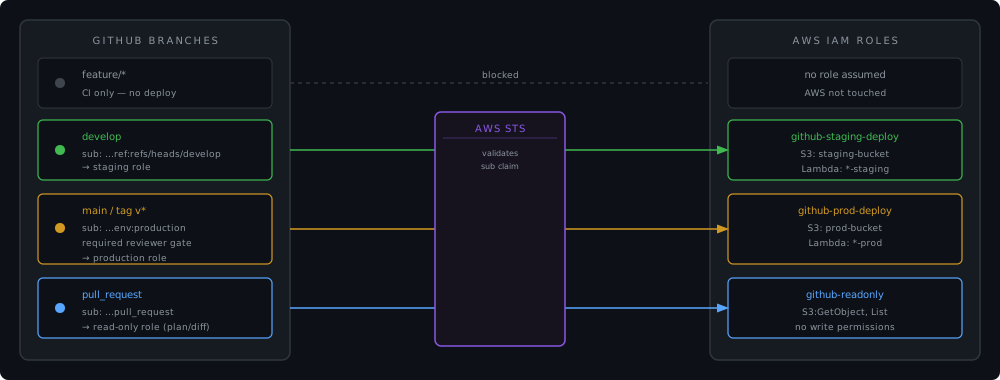
<p>The right model is one role per environment per function, each with the minimum permissions it needs.</p>

<figure>
  <img src="/assets/images/github-aws-oidc-cicd/multi-env.svg" alt="Branch-to-role mapping: feature branches get no AWS access, develop maps to a staging role, main and tags map to a production role with an approval gate, pull requests map to a read-only role" />
  <figcaption>Each branch context maps to a dedicated IAM role. Production requires a GitHub Environment with a required reviewer - the OIDC subject claim for that environment is only issued after the gate passes.</figcaption>
</figure>

<p>The trust policy structure is the same as the one in the previous section - only the <code class="language-plaintext highlighter-rouge">sub</code> condition changes per role. For staging, scoped to the <code class="language-plaintext highlighter-rouge">develop</code> branch:</p>

<div class="language-bash highlighter-rouge"><div class="highlight"><pre class="highlight"><code><span class="c"># trust-policy-staging.json - sub: "repo:your-org/your-repo:ref:refs/heads/develop"</span>
aws iam create-role <span class="se">\</span>
  <span class="nt">--role-name</span> github-staging-deploy <span class="se">\</span>
  <span class="nt">--assume-role-policy-document</span> file://trust-policy-staging.json
</code></pre></div></div>

<p>For production, scoped to the GitHub Environment instead of a branch:</p>

<div class="language-bash highlighter-rouge"><div class="highlight"><pre class="highlight"><code><span class="c"># trust-policy-prod.json - sub: "repo:your-org/your-repo:environment:production"</span>
aws iam create-role <span class="se">\</span>
  <span class="nt">--role-name</span> github-prod-deploy <span class="se">\</span>
  <span class="nt">--assume-role-policy-document</span> file://trust-policy-prod.json
</code></pre></div></div>

<hr />

<h2 id="the-workflow-side">The workflow side</h2>

<p>Here is what the GitHub Actions side looks like, based on the <a href="https://github.com/mguarinos/streamline">Streamline project</a>:</p>

<div class="language-yaml highlighter-rouge"><div class="highlight"><pre class="highlight"><code><span class="na">jobs</span><span class="pi">:</span>
  <span class="na">prepare</span><span class="pi">:</span>
    <span class="na">runs-on</span><span class="pi">:</span> <span class="s">ubuntu-latest</span>
    <span class="na">permissions</span><span class="pi">:</span>
      <span class="na">contents</span><span class="pi">:</span> <span class="s">read</span>          <span class="c1"># no id-token here - this job doesn't touch AWS</span>

  <span class="na">deploy-frontend</span><span class="pi">:</span>
    <span class="na">needs</span><span class="pi">:</span> <span class="s">prepare</span>
    <span class="na">runs-on</span><span class="pi">:</span> <span class="s">ubuntu-latest</span>
    <span class="na">environment</span><span class="pi">:</span> <span class="s">production</span>   <span class="c1"># triggers the GitHub Environment gate</span>
    <span class="na">permissions</span><span class="pi">:</span>
      <span class="na">id-token</span><span class="pi">:</span> <span class="s">write</span>         <span class="c1"># required to request the OIDC token</span>
      <span class="na">contents</span><span class="pi">:</span> <span class="s">read</span>
    <span class="na">steps</span><span class="pi">:</span>
      <span class="pi">-</span> <span class="na">uses</span><span class="pi">:</span> <span class="s">actions/checkout@v4</span>

      <span class="pi">-</span> <span class="na">uses</span><span class="pi">:</span> <span class="s">aws-actions/configure-aws-credentials@v4</span>
        <span class="na">with</span><span class="pi">:</span>
          <span class="na">role-to-assume</span><span class="pi">:</span> <span class="s">$</span>
          <span class="na">aws-region</span><span class="pi">:</span> <span class="s">$</span>

      <span class="pi">-</span> <span class="na">name</span><span class="pi">:</span> <span class="s">Deploy</span>
        <span class="na">run</span><span class="pi">:</span> <span class="pi">|</span>
          <span class="s">aws s3 sync frontend/ s3://$ \</span>
            <span class="s">--cache-control "public, max-age=31536000, immutable"</span>
</code></pre></div></div>

<p>Three things to notice:</p>

<p><strong><code class="language-plaintext highlighter-rouge">id-token: write</code> is job-scoped.</strong> The <code class="language-plaintext highlighter-rouge">prepare</code> job reads the repository and detects what changed - it never touches AWS, so it doesn’t request the OIDC permission. Only the jobs that call <code class="language-plaintext highlighter-rouge">configure-aws-credentials</code> need <code class="language-plaintext highlighter-rouge">id-token: write</code>. At the workflow level the default permission is <code class="language-plaintext highlighter-rouge">id-token: none</code>, which is correct.</p>

<p><strong><code class="language-plaintext highlighter-rouge">environment: production</code> is where the approval gate lives.</strong> Set this on the job, not the workflow. GitHub will pause the job and require the designated reviewers to approve before the OIDC token is issued. The <code class="language-plaintext highlighter-rouge">sub</code> claim will contain <code class="language-plaintext highlighter-rouge">environment:production</code> only after approval - matching your IAM trust policy condition.</p>

<p><strong><code class="language-plaintext highlighter-rouge">role-to-assume</code> accepts an ARN, not a key pair.</strong> There is no <code class="language-plaintext highlighter-rouge">aws-access-key-id</code> or <code class="language-plaintext highlighter-rouge">aws-secret-access-key</code>. The action handles the full OIDC exchange internally and exports the standard <code class="language-plaintext highlighter-rouge">AWS_*</code> environment variables for subsequent steps.</p>

<hr />

<h2 id="compliance-and-audit-advantages">Compliance and audit advantages</h2>

<h3 id="no-credential-to-rotate-leak-or-audit">No credential to rotate, leak, or audit</h3>

<p>Long-lived IAM credentials require rotation policies, leak detection (AWS regularly scans public repos and revokes exposed keys), access key age alarms in Security Hub, and periodic audits of who has credentials and whether they are still needed. OIDC eliminates all of this for CI/CD. The credential surface shrinks to the GitHub-issued token, which expires in minutes and cannot be reused outside the context it was issued for.</p>

<h3 id="cloudtrail-records-the-full-identity-chain">CloudTrail records the full identity chain</h3>

<p>Every <code class="language-plaintext highlighter-rouge">AssumeRoleWithWebIdentity</code> call creates a CloudTrail event. That event includes:</p>

<ul>
  <li>The role ARN that was assumed</li>
  <li>The OIDC subject claim: <code class="language-plaintext highlighter-rouge">repo:your-org/your-repo:environment:production</code></li>
  <li>The OIDC issuer</li>
  <li>The source IP of the GitHub runner</li>
  <li>The resulting session ARN</li>
</ul>

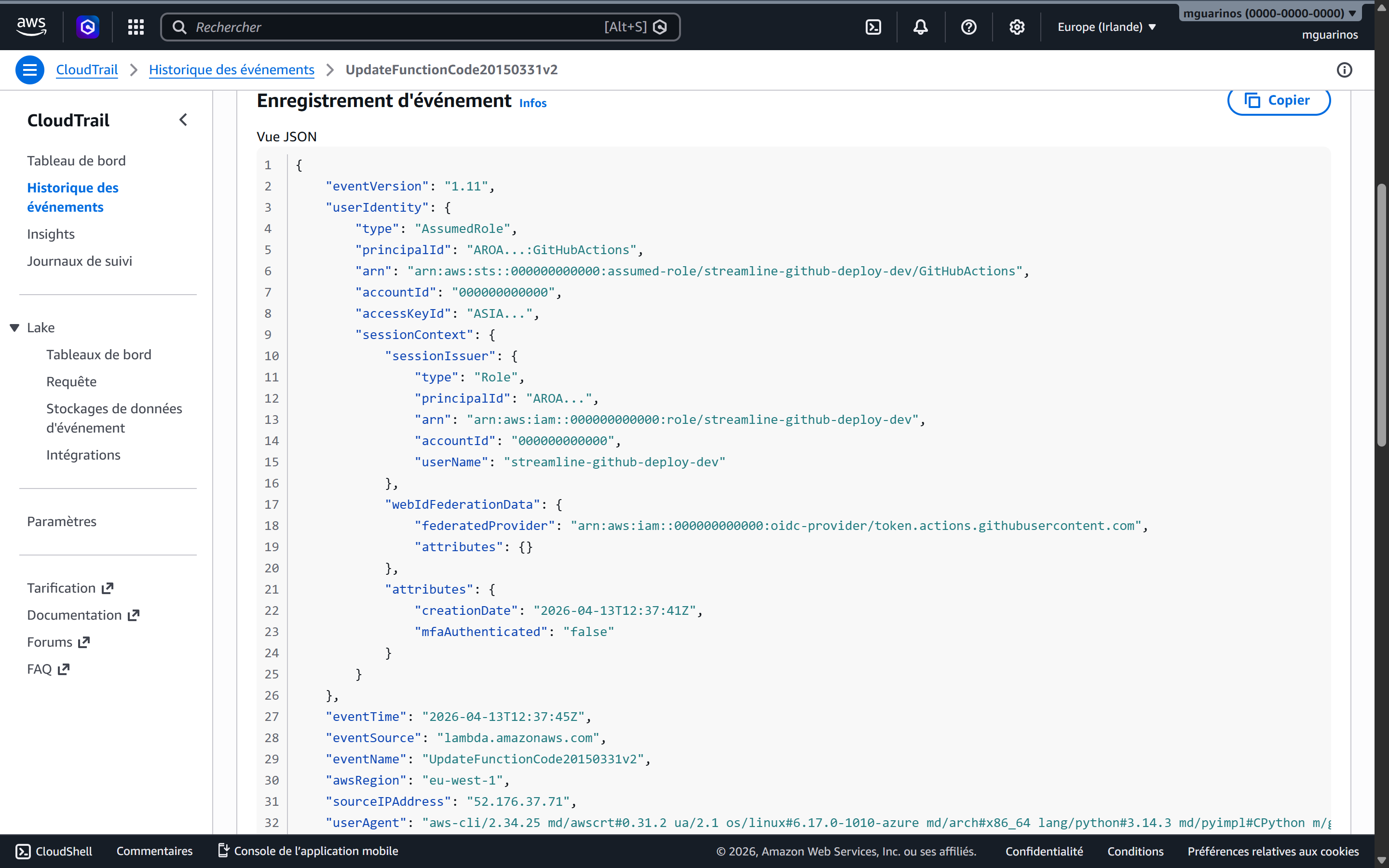
<p>Every subsequent AWS API call in that session carries the session ARN. You can trace any S3 put, Lambda invocation, or CloudFront invalidation back to the exact repository, branch, and workflow run that triggered it.</p>

<figure>
  <img src="/assets/images/github-aws-oidc-cicd/cloudtrail-screenshot.png" alt="AWS CloudTrail event showing UpdateFunctionCode triggered by GitHubActions with a temporary ASIA access key and the runner's source IP" />
  <figcaption>A real CloudTrail event from a Streamline deploy. The access key starts with <code>ASIA</code> - the STS temporary credential prefix, not a long-lived <code>AKIA</code> key. The username is the IAM role session name set by the workflow, and the source IP belongs to a GitHub-hosted runner.</figcaption>
</figure>

<h3 id="soc-2-and-iso-27001-alignment">SOC 2 and ISO 27001 alignment</h3>

<p>Both frameworks require demonstrable least-privilege access and evidence that access is scoped to need. The trust policy <code class="language-plaintext highlighter-rouge">sub</code> condition is machine-readable proof that production credentials can only be issued to workflows running against a specific environment after human approval. The IAM role configuration and the GitHub Environment settings together constitute an auditable, version-controlled access control - auditors can inspect both without relying on convention or documentation.</p>

<p>The absence of stored credentials also satisfies key management controls: there is no AWS credential in your secret store, so there is nothing to rotate, nothing that can be extracted from a compromised runner cache, and no access key age to report.</p>

<hr />

<h2 id="what-you-might-miss">What you might miss</h2>

<p><strong>The <code class="language-plaintext highlighter-rouge">aud</code> condition is not optional.</strong> Without it, any JWT issued by <code class="language-plaintext highlighter-rouge">token.actions.githubusercontent.com</code> - from any organisation or repository on GitHub - could attempt to assume your role. The <code class="language-plaintext highlighter-rouge">sub</code> condition alone does not protect you if someone else’s repository happens to have a matching subject pattern.</p>

<p><strong><code class="language-plaintext highlighter-rouge">StringLike</code> vs <code class="language-plaintext highlighter-rouge">StringEquals</code> for wildcards.</strong> Use <code class="language-plaintext highlighter-rouge">StringEquals</code> for exact matches - it’s faster and leaves no room for misinterpretation. Use <code class="language-plaintext highlighter-rouge">StringLike</code> only when you need <code class="language-plaintext highlighter-rouge">*</code> or <code class="language-plaintext highlighter-rouge">?</code>. Do not use <code class="language-plaintext highlighter-rouge">StringLike</code> with an exact value; it works but signals that the intent was something more permissive.</p>

<p><strong>Branch protection and environment protection are separate layers.</strong> The OIDC trust policy restricts which context can assume a role. Branch protection rules prevent who can push to the branch in the first place. GitHub Environment required reviewers gate who can deploy. All three are independent - losing one does not compromise the others, but the strongest posture uses all three.</p>

<p><strong>Session duration.</strong> The default session for <code class="language-plaintext highlighter-rouge">AssumeRoleWithWebIdentity</code> is one hour, which is the maximum unless the role’s <code class="language-plaintext highlighter-rouge">MaxSessionDuration</code> is extended. Deployments taking longer than an hour will fail mid-run with expired credentials. Set <code class="language-plaintext highlighter-rouge">role-session-duration</code> in the action or extend the role’s max session if needed.</p>

<p><strong>IAM permission boundaries prevent privilege escalation.</strong> If a deployment role has <code class="language-plaintext highlighter-rouge">iam:CreateRole</code> or <code class="language-plaintext highlighter-rouge">iam:AttachRolePolicy</code>, it can in theory create a new role with more permissions than it has. A permission boundary applied to all roles created by the deploy role caps what those child roles can ever do.</p>

<hr />

<h2 id="putting-it-together">Putting it together</h2>

<p>The setup reduces to five things:</p>

<ol>
  <li><strong>An IAM OIDC provider</strong> - registered once per AWS account, pointing at <code class="language-plaintext highlighter-rouge">https://token.actions.githubusercontent.com</code>.</li>
  <li><strong>One IAM role per environment per access level</strong> - each with a trust policy that <code class="language-plaintext highlighter-rouge">StringEquals</code> the <code class="language-plaintext highlighter-rouge">sub</code> claim to the exact context allowed.</li>
  <li><strong>A scoped permissions policy on each role</strong> - listing only the specific resource ARNs the pipeline needs to touch.</li>
  <li><strong>A GitHub Environment</strong> for each production-grade deployment target - with required reviewers and (optionally) a deployment wait timer.</li>
  <li><strong><code class="language-plaintext highlighter-rouge">permissions: id-token: write</code></strong> on the specific jobs that call <code class="language-plaintext highlighter-rouge">configure-aws-credentials</code>, and only those jobs.</li>
</ol>

<p>The resulting pipeline has no secrets to manage in GitHub, produces a full attribution chain in CloudTrail, and can only deploy to production after a human explicitly approves it through a gated GitHub Environment - all without any changes to how the actual deployment steps work.</p>]]></content><author><name>Manuel Guarinos</name></author><category term="aws" /><category term="devops" /><category term="security" /><category term="aws" /><category term="github-actions" /><category term="oidc" /><category term="iam" /><category term="cicd" /><category term="security" /><category term="compliance" /><summary type="html"><![CDATA[Replace long-lived AWS credentials in GitHub secrets with short-lived tokens using OIDC federation. Covers trust policy setup, per-branch and per-environment scoping, multi-environment role design, and the compliance gains you get for free.]]></summary><media:thumbnail xmlns:media="http://search.yahoo.com/mrss/" url="https://mguarinos.com/assets/images/github-aws-oidc-cicd/header.svg" /><media:content medium="image" url="https://mguarinos.com/assets/images/github-aws-oidc-cicd/header.svg" xmlns:media="http://search.yahoo.com/mrss/" /></entry><entry><title type="html">The Kubernetes Operator Pattern: teaching your cluster to manage anything</title><link href="https://mguarinos.com/posts/2026/04/15/kubernetes-operator-pattern/" rel="alternate" type="text/html" title="The Kubernetes Operator Pattern: teaching your cluster to manage anything" /><published>2026-04-15T00:00:00+00:00</published><updated>2026-04-15T00:00:00+00:00</updated><id>https://mguarinos.com/posts/2026/04/15/kubernetes-operator-pattern</id><content type="html" xml:base="https://mguarinos.com/posts/2026/04/15/kubernetes-operator-pattern/"><![CDATA[<p>When you run <code class="language-plaintext highlighter-rouge">kubectl apply</code>, nothing executes your manifest directly. The API server writes your desired state to etcd, and a control loop running somewhere in the cluster notices the gap between what you asked for and what currently exists - then closes it. That loop is a controller. A Deployment is a controller. A ReplicaSet is a controller. The entire Kubernetes architecture is built on this pattern.</p>

<p>An operator is what happens when you take that same pattern and point it at something you own: a database, a DNS record, an SSL certificate, a Slack channel. The operator extends Kubernetes’ reconciliation model to resources that have nothing to do with running containers.</p>

<p>This post uses a Cloudflare DNS operator as the running example - an operator that watches <code class="language-plaintext highlighter-rouge">CloudflareDNSRecord</code> objects in the cluster and syncs them to the Cloudflare API. The source is <a href="https://github.com/mguarinos/kubernetes-cloudflare-dns-operator">here</a>.</p>

<hr />

<h2 id="the-problem-operators-solve">The problem operators solve</h2>

<p>Helm charts and plain manifests handle static configuration well. You describe what you want, apply it, and Kubernetes makes it happen. But this works because Kubernetes itself knows how to reconcile pods, services, and config maps. It has no idea what a Cloudflare DNS record is.</p>

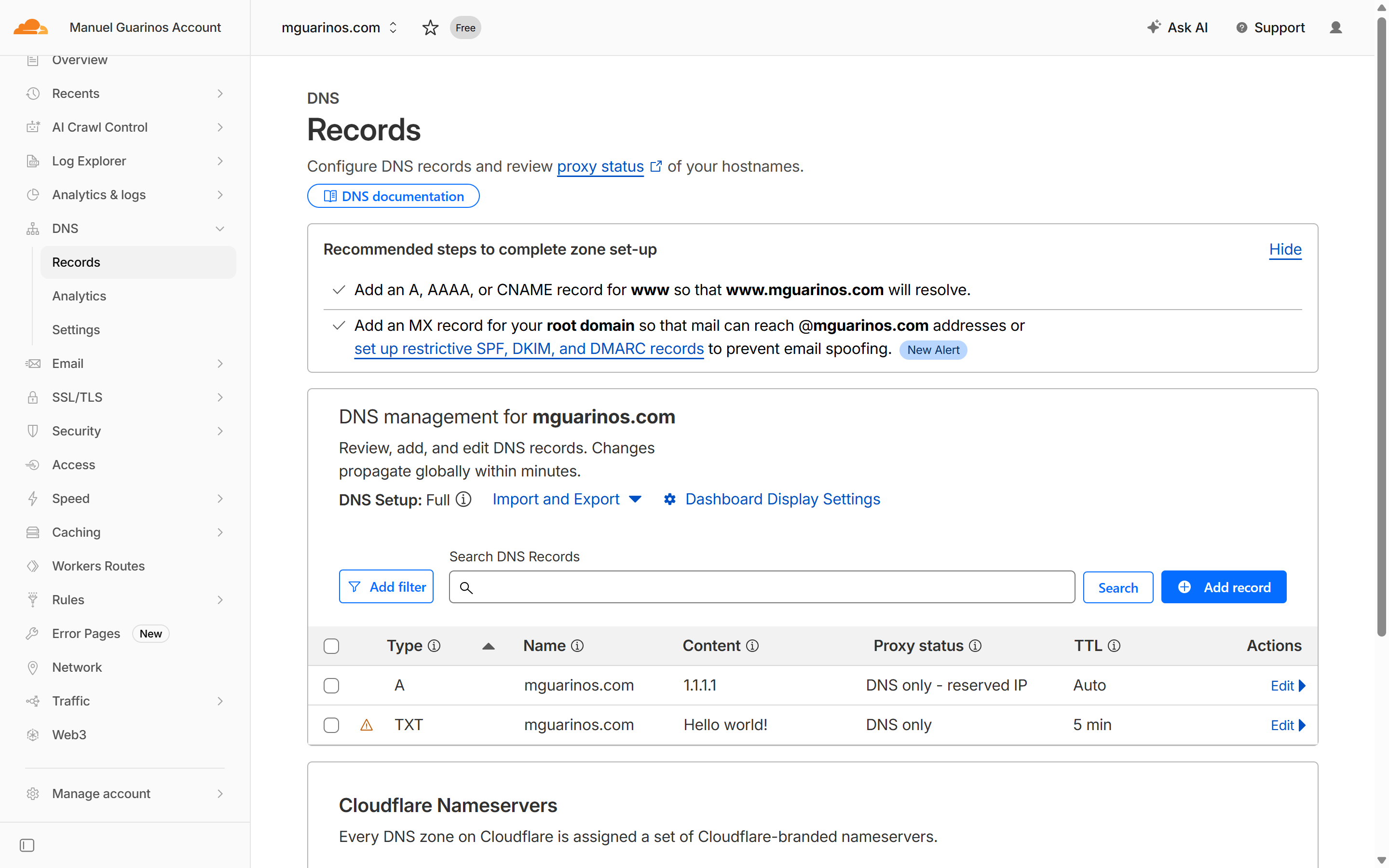
<p>The traditional answer is automation outside the cluster: a CI pipeline that calls <code class="language-plaintext highlighter-rouge">curl</code> against the Cloudflare API when a variable changes, a shell script someone runs manually, a Terraform workspace that drifts quietly for months. These work, but they all share the same problem: the external resource is not a first-class citizen in the cluster. You can’t <code class="language-plaintext highlighter-rouge">kubectl get</code> it, you can’t set a <code class="language-plaintext highlighter-rouge">dependsOn</code>, you can’t see its status alongside your other resources. And when someone edits it directly in the Cloudflare dashboard, nothing notices.</p>

<p>Operators bring external resources inside Kubernetes’ reconciliation boundary. Once you have an operator, a DNS record is just another Kubernetes object.</p>

<figure>
  <img src="/assets/images/kubernetes-operator-pattern/cloudflare-dns-console.png" alt="Cloudflare DNS dashboard showing a list of DNS records for a zone" />
  <figcaption>The Cloudflare DNS console - records that exist here are the live state. The operator's job is to keep this in sync with what Kubernetes says.</figcaption>
</figure>

<hr />

<h2 id="crds-giving-kubernetes-new-vocabulary">CRDs: giving Kubernetes new vocabulary</h2>

<p>Before you can write an operator, you need to teach Kubernetes what your resource type looks like. Custom Resource Definitions (CRDs) are the mechanism. A CRD is itself a Kubernetes manifest - you apply it once, and from that point on the API server accepts and stores objects of that type.</p>

<p>The DNS operator’s CRD registers the <code class="language-plaintext highlighter-rouge">CloudflareDNSRecord</code> kind under <code class="language-plaintext highlighter-rouge">dns.operator.io/v1</code>. The CRD is a manifest like any other - you <code class="language-plaintext highlighter-rouge">kubectl apply</code> it once and the API server learns the new type:</p>

<div class="language-yaml highlighter-rouge"><div class="highlight"><pre class="highlight"><code><span class="na">apiVersion</span><span class="pi">:</span> <span class="s">apiextensions.k8s.io/v1</span>
<span class="na">kind</span><span class="pi">:</span> <span class="s">CustomResourceDefinition</span>
<span class="na">metadata</span><span class="pi">:</span>
  <span class="na">name</span><span class="pi">:</span> <span class="s">cloudflarednsrecords.dns.operator.io</span>   <span class="c1"># &lt;plural&gt;.&lt;group&gt;</span>
<span class="na">spec</span><span class="pi">:</span>
  <span class="na">group</span><span class="pi">:</span> <span class="s">dns.operator.io</span>
  <span class="na">scope</span><span class="pi">:</span> <span class="s">Namespaced</span>
  <span class="na">names</span><span class="pi">:</span>
    <span class="na">plural</span><span class="pi">:</span> <span class="s">cloudflarednsrecords</span>
    <span class="na">singular</span><span class="pi">:</span> <span class="s">cloudflarednsrecord</span>
    <span class="na">kind</span><span class="pi">:</span> <span class="s">CloudflareDNSRecord</span>
    <span class="na">shortNames</span><span class="pi">:</span> <span class="pi">[</span><span class="nv">cfdr</span><span class="pi">]</span>
  <span class="na">versions</span><span class="pi">:</span>
    <span class="pi">-</span> <span class="na">name</span><span class="pi">:</span> <span class="s">v1</span>
      <span class="na">served</span><span class="pi">:</span> <span class="kc">true</span>
      <span class="na">storage</span><span class="pi">:</span> <span class="kc">true</span>
      <span class="c1"># Status is a separate write path - the operator patches it without</span>
      <span class="c1"># triggering an on.update on the spec.</span>
      <span class="na">subresources</span><span class="pi">:</span>
        <span class="na">status</span><span class="pi">:</span> <span class="pi">{}</span>
      <span class="c1"># OpenAPI schema: the API server validates every object before storing it.</span>
      <span class="na">schema</span><span class="pi">:</span>
        <span class="na">openAPIV3Schema</span><span class="pi">:</span>
          <span class="na">type</span><span class="pi">:</span> <span class="s">object</span>
          <span class="na">properties</span><span class="pi">:</span>
            <span class="na">spec</span><span class="pi">:</span>
              <span class="na">type</span><span class="pi">:</span> <span class="s">object</span>
              <span class="na">required</span><span class="pi">:</span> <span class="pi">[</span><span class="nv">zone_id</span><span class="pi">,</span> <span class="nv">name</span><span class="pi">,</span> <span class="nv">type</span><span class="pi">,</span> <span class="nv">content</span><span class="pi">]</span>
              <span class="na">properties</span><span class="pi">:</span>
                <span class="na">zone_id</span><span class="pi">:</span> <span class="pi">{</span> <span class="nv">type</span><span class="pi">:</span> <span class="nv">string</span> <span class="pi">}</span>
                <span class="na">name</span><span class="pi">:</span>    <span class="pi">{</span> <span class="nv">type</span><span class="pi">:</span> <span class="nv">string</span> <span class="pi">}</span>
                <span class="na">type</span><span class="pi">:</span>
                  <span class="na">type</span><span class="pi">:</span> <span class="s">string</span>
                  <span class="na">enum</span><span class="pi">:</span> <span class="pi">[</span><span class="nv">A</span><span class="pi">,</span> <span class="nv">AAAA</span><span class="pi">,</span> <span class="nv">CNAME</span><span class="pi">,</span> <span class="nv">TXT</span><span class="pi">,</span> <span class="nv">MX</span><span class="pi">,</span> <span class="nv">NS</span><span class="pi">,</span> <span class="nv">SRV</span><span class="pi">,</span> <span class="nv">CAA</span><span class="pi">]</span>
                <span class="na">content</span><span class="pi">:</span> <span class="pi">{</span> <span class="nv">type</span><span class="pi">:</span> <span class="nv">string</span> <span class="pi">}</span>
                <span class="na">ttl</span><span class="pi">:</span>     <span class="pi">{</span> <span class="nv">type</span><span class="pi">:</span> <span class="nv">integer</span><span class="pi">,</span> <span class="nv">default</span><span class="pi">:</span> <span class="nv">1</span> <span class="pi">}</span>
                <span class="na">proxied</span><span class="pi">:</span> <span class="pi">{</span> <span class="nv">type</span><span class="pi">:</span> <span class="nv">boolean</span><span class="pi">,</span> <span class="nv">default</span><span class="pi">:</span> <span class="nv">false</span> <span class="pi">}</span>
            <span class="na">status</span><span class="pi">:</span>
              <span class="na">type</span><span class="pi">:</span> <span class="s">object</span>
              <span class="na">x-kubernetes-preserve-unknown-fields</span><span class="pi">:</span> <span class="kc">true</span>
</code></pre></div></div>

<p>With the CRD applied and the operator running, you can create records by applying ordinary manifests. Here are two - an A record and a TXT record:</p>

<div class="language-yaml highlighter-rouge"><div class="highlight"><pre class="highlight"><code><span class="na">apiVersion</span><span class="pi">:</span> <span class="s">dns.operator.io/v1</span>
<span class="na">kind</span><span class="pi">:</span> <span class="s">CloudflareDNSRecord</span>
<span class="na">metadata</span><span class="pi">:</span>
  <span class="na">name</span><span class="pi">:</span> <span class="s">mguarinos-com-apex-a</span>
<span class="na">spec</span><span class="pi">:</span>
  <span class="na">zone_id</span><span class="pi">:</span> <span class="s2">"</span><span class="s">daeed8d03dd34a9923222a33e96986ff"</span>
  <span class="na">name</span><span class="pi">:</span> <span class="s2">"</span><span class="s">mguarinos.com"</span>
  <span class="na">type</span><span class="pi">:</span> <span class="s2">"</span><span class="s">A"</span>
  <span class="na">content</span><span class="pi">:</span> <span class="s2">"</span><span class="s">1.1.1.1"</span>
  <span class="na">ttl</span><span class="pi">:</span> <span class="m">1</span>
<span class="nn">---</span>
<span class="na">apiVersion</span><span class="pi">:</span> <span class="s">dns.operator.io/v1</span>
<span class="na">kind</span><span class="pi">:</span> <span class="s">CloudflareDNSRecord</span>
<span class="na">metadata</span><span class="pi">:</span>
  <span class="na">name</span><span class="pi">:</span> <span class="s">mguarinos-com-apex-txt</span>
<span class="na">spec</span><span class="pi">:</span>
  <span class="na">zone_id</span><span class="pi">:</span> <span class="s2">"</span><span class="s">daeed8d03dd34a9923222a33e96986ff"</span>
  <span class="na">name</span><span class="pi">:</span> <span class="s2">"</span><span class="s">mguarinos.com"</span>
  <span class="na">type</span><span class="pi">:</span> <span class="s2">"</span><span class="s">TXT"</span>
  <span class="na">content</span><span class="pi">:</span> <span class="s2">"</span><span class="s">Hello</span><span class="nv"> </span><span class="s">world!"</span>
  <span class="na">ttl</span><span class="pi">:</span> <span class="m">300</span>
</code></pre></div></div>

<div class="language-bash highlighter-rouge"><div class="highlight"><pre class="highlight"><code>kubectl apply <span class="nt">-f</span> records.yaml <span class="nt">-n</span> cf-operator
</code></pre></div></div>

<div class="language-text highlighter-rouge"><div class="highlight"><pre class="highlight"><code>cloudflarednsrecord.dns.operator.io/mguarinos-com-apex-a created
cloudflarednsrecord.dns.operator.io/mguarinos-com-apex-txt
</code></pre></div></div>

<p>The operator picks up both objects immediately and creates the corresponding records in Cloudflare. A few seconds later:</p>

<div class="language-bash highlighter-rouge"><div class="highlight"><pre class="highlight"><code>kubectl get cfdr <span class="nt">-n</span> cf-operator
</code></pre></div></div>

<div class="language-text highlighter-rouge"><div class="highlight"><pre class="highlight"><code>kubectl get cfdr -n cf-operator -o wide
NAME                     NAME            TYPE   CONTENT        STATUS          LAST SYNC              AGE   ZONE ID                            RECORD ID                          TTL   PROXIED
mguarinos-com-apex-a     mguarinos.com   A      1.1.1.1        RecordSynced    2026-04-15T22:02:55Z   12s   daeed8d03dd34a9923222a33e96986ff   c62658232a4663be7d9610f69b186572   1     false
mguarinos-com-apex-txt   mguarinos.com   TXT    Hello world!   RecordSynced    2026-04-15T22:03:01Z   6s    daeed8d03dd34a9923222a33e96986ff   aafac48cbcc241ca882e1646e24098a8   300   false

</code></pre></div></div>

<p>CRDs also define a <code class="language-plaintext highlighter-rouge">status</code> subresource, which is a separate write path from the spec. The operator uses it to record what it observed: the Cloudflare record ID it created, the last sync timestamp, and a standard Kubernetes <code class="language-plaintext highlighter-rouge">conditions</code> array. The single condition (<code class="language-plaintext highlighter-rouge">type: Synced</code>) follows the <code class="language-plaintext highlighter-rouge">True</code>/<code class="language-plaintext highlighter-rouge">False</code> convention with a CamelCase <code class="language-plaintext highlighter-rouge">reason</code> token - <code class="language-plaintext highlighter-rouge">RecordSynced</code>, <code class="language-plaintext highlighter-rouge">DriftDetected</code>, or <code class="language-plaintext highlighter-rouge">SyncFailed</code> - and a human-readable <code class="language-plaintext highlighter-rouge">message</code> field. Using the standard conditions format means tools like <code class="language-plaintext highlighter-rouge">kubectl wait</code>, ArgoCD health checks, and other GitOps tooling understand the resource state without any custom logic. The subresource separation means the operator can patch status without triggering a reconciliation on the spec - there is no event loop between the two.</p>

<div class="language-text highlighter-rouge"><div class="highlight"><pre class="highlight"><code>kubectl describe cfdr -n cf-operator mguarinos-com-apex-a
Name:         mguarinos-com-apex-a
Namespace:    cf-operator
Labels:       &lt;none&gt;
Annotations:  kopf.zalando.org/last-handled-configuration:
                {"spec":{"content":"1.1.1.1","name":"mguarinos.com","proxied":false,"ttl":1,"type":"A","zone_id":"daeed8d03dd34a9923222a33e96986ff"}}
API Version:  dns.operator.io/v1
Kind:         CloudflareDNSRecord
Metadata:
  Creation Timestamp:  2026-04-15T22:32:47Z
  Finalizers:
    dns.operator.io/cloudflare-cleanup
  Generation:        1
  Resource Version:  7945
  UID:               1c4f445a-fa38-4584-aca7-f1c1d3580d4d
Spec:
  Content:  1.1.1.1
  Name:     mguarinos.com
  Proxied:  false
  Ttl:      1
  Type:     A
  zone_id:  daeed8d03dd34a9923222a33e96986ff
Status:
  Conditions:
    Last Transition Time:  2026-04-15T22:32:48Z
    Message:
    Reason:                RecordSynced
    Status:                True
    Type:                  Synced
  last_sync:    2026-04-15T22:32:48Z
  record_id:    c6853b1fecfd4e3efbd263f835eb70fa
Events:         &lt;none&gt;
</code></pre></div></div>

<hr />

<h2 id="the-reconciliation-loop">The reconciliation loop</h2>

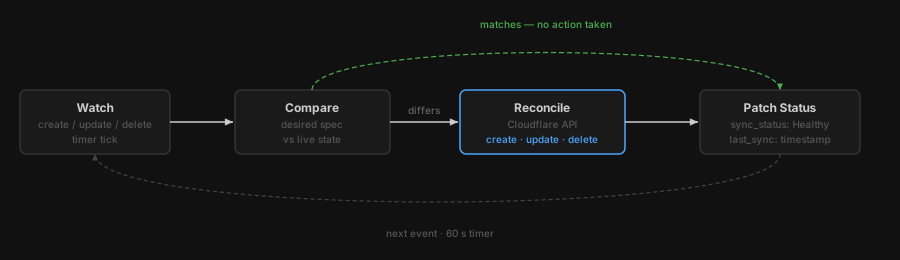
<p>An operator is a process - typically a pod in the cluster - that watches the Kubernetes API for events on its custom resource type and reacts to them. The core of the DNS operator is four handlers:</p>

<p><strong>on.create</strong> - when a <code class="language-plaintext highlighter-rouge">CloudflareDNSRecord</code> object appears, call <code class="language-plaintext highlighter-rouge">cf.dns.records.create</code>, then write the returned Cloudflare record ID into <code class="language-plaintext highlighter-rouge">.status.record_id</code>. That ID is the link between the Kubernetes object and the external resource. Without it, the operator cannot update or delete the record later.</p>

<p><strong>on.update</strong> - when the spec changes, call <code class="language-plaintext highlighter-rouge">cf.dns.records.update</code> with the new values. If the status has no <code class="language-plaintext highlighter-rouge">record_id</code> (the operator was offline when the object was created), fall back to creating the record rather than failing.</p>

<p><strong>on.delete</strong> - delete the Cloudflare record before allowing Kubernetes to remove the object. The finalizer (described below) is what makes this ordering possible.</p>

<p><strong>timer</strong> - every 60 seconds, fetch the live record from Cloudflare and compare it to the spec. If they differ, revert Cloudflare to match Kubernetes.</p>

<p>When the operator pod starts you can see all of this initialising in the logs:</p>

<div class="language-text highlighter-rouge"><div class="highlight"><pre class="highlight"><code>kubectl logs -n cf-operator cloudflare-dns-operator-6b55f8556d-5hw97
[2026-04-15 21:59:48,041] kopf._core.reactor.r [DEBUG   ] Starting Kopf 1.44.5.
[2026-04-15 21:59:48,042] kopf.activities.star [DEBUG   ] Activity 'on_startup' is invoked.
[2026-04-15 21:59:48,042] __kopf_script_0__src [INFO    ] Cloudflare DNS Operator starting. namespace=cf-operator  secret=cloudflare-api-token  drift_interval=60s
[2026-04-15 21:59:48,043] helpers              [DEBUG   ] K8s config: loaded in-cluster service-account credentials.
[2026-04-15 21:59:48,052] kubernetes.client.re [DEBUG   ] response body: {REDACTED}

[2026-04-15 21:59:48,054] __kopf_script_0__src [INFO    ] Cloudflare token loaded successfully (length=53).
[2026-04-15 21:59:48,055] kopf.activities.star [INFO    ] Activity 'on_startup' succeeded.
[2026-04-15 21:59:48,056] kopf._core.engines.a [INFO    ] Initial authentication has been initiated.
[2026-04-15 21:59:48,056] kopf.activities.auth [DEBUG   ] Activity 'login_via_client' is invoked.
[2026-04-15 21:59:48,057] kopf.activities.auth [DEBUG   ] Client is configured in cluster with service account.
[2026-04-15 21:59:48,058] kopf.activities.auth [INFO    ] Activity 'login_via_client' succeeded.
[2026-04-15 21:59:48,058] kopf._core.engines.a [INFO    ] Initial authentication has finished.
[2026-04-15 21:59:48,152] kopf._cogs.clients.w [DEBUG   ] Starting the watch-stream for customresourcedefinitions.v1.apiextensions.k8s.io cluster-wide.
[2026-04-15 21:59:48,153] kopf._cogs.clients.w [DEBUG   ] Starting the watch-stream for cloudflarednsrecords.v1.dns.operator.io cluster-wide.
</code></pre></div></div>

<p>Together these four handlers mean the operator never needs to be told what changed. It observes events and acts on them. If the operator crashes and restarts, the reconciliation loop catches up automatically - any pending creates become updates, any missed deletes are replayed.</p>

<figure>
  <img src="/assets/images/kubernetes-operator-pattern/reconciliation-loop.svg" alt="The reconciliation loop: Watch → Compare → Reconcile → Patch Status, with a bypass arc for the 'matches' case and a feedback loop back to Watch" />
  <figcaption>The four-step loop. When the live state matches the spec, the Reconcile step is skipped entirely (green arc). The loop repeats on every event and every 60-second timer tick.</figcaption>
</figure>

<hr />

<h2 id="finalizers-the-guarantee-on-delete">Finalizers: the guarantee on delete</h2>

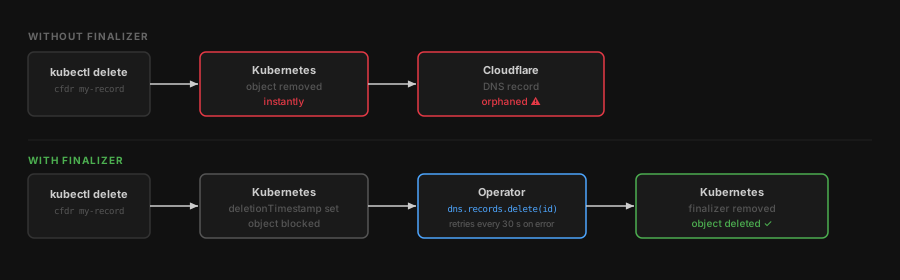
<p>Without a finalizer, <code class="language-plaintext highlighter-rouge">kubectl delete</code> removes the Kubernetes object immediately and the Cloudflare record is left behind. Finalizers prevent that.</p>

<p>When the operator starts, it registers the string <code class="language-plaintext highlighter-rouge">dns.operator.io/cloudflare-cleanup</code> as a finalizer on every object it manages. Kubernetes will not actually delete an object that has a finalizer on it - it only sets a <code class="language-plaintext highlighter-rouge">deletionTimestamp</code> and blocks. The API server then fires a delete event to the operator.</p>

<p>The operator’s delete handler calls <code class="language-plaintext highlighter-rouge">cf.dns.records.delete</code>. If that call succeeds, the handler returns and the operator removes the finalizer. Kubernetes sees the finalizer list is now empty and removes the object. If the Cloudflare call fails the handler raises a temporary error and the framework retries it every 30 seconds. The finalizer stays in place until the deletion is confirmed.</p>

<p>The result: as long as the operator is running, it is impossible for a <code class="language-plaintext highlighter-rouge">kubectl delete</code> to leave an orphaned DNS record.</p>

<figure>
  <img src="/assets/images/kubernetes-operator-pattern/finalizer.svg" alt="Without a finalizer: kubectl delete removes the object immediately, leaving the Cloudflare DNS record orphaned. With a finalizer: the object is blocked until the operator confirms the record is deleted from Cloudflare." />
  <figcaption>Without a finalizer, the Kubernetes object disappears before anything cleans up Cloudflare. The finalizer inverts the order: the external resource is deleted first, then Kubernetes removes the object.</figcaption>
</figure>

<hr />

<h2 id="drift-detection-kubernetes-as-the-source-of-truth">Drift detection: Kubernetes as the source of truth</h2>

<p>The timer handler is where the operator earns its keep.</p>

<p>Kubernetes stores the desired state. Cloudflare holds the live state. These can diverge whenever a human edits a record directly in the Cloudflare dashboard. Without an operator, that divergence is silent - your IaC says one thing, your DNS actually does another.</p>

<p>Every 60 seconds the operator fetches the record from Cloudflare and diffs <code class="language-plaintext highlighter-rouge">content</code>, <code class="language-plaintext highlighter-rouge">proxied</code>, and <code class="language-plaintext highlighter-rouge">ttl</code> against the spec. If anything differs, it logs the exact discrepancy and calls <code class="language-plaintext highlighter-rouge">cf.dns.records.update</code> to revert it. The condition reason is set to <code class="language-plaintext highlighter-rouge">DriftDetected</code> the moment divergence is found, and back to <code class="language-plaintext highlighter-rouge">RecordSynced</code> once the revert succeeds.</p>

<p>To see this in action: go to the Cloudflare dashboard and change the IP on <code class="language-plaintext highlighter-rouge">mguarinos.com</code> from <code class="language-plaintext highlighter-rouge">1.1.1.1</code> to <code class="language-plaintext highlighter-rouge">1.0.0.1</code>. Within 60 seconds the operator logs:</p>

<div class="language-text highlighter-rouge"><div class="highlight"><pre class="highlight"><code>[2026-04-15 22:03:55,213] kopf.objects         [WARNING ] [cf-operator/mguarinos-com-apex-a] Drift detected on record id=c62658232a4663be7d9610f69b186572 name=mguarinos.com:
  content : live='1.0.0.1'                       desired='1.1.1.1'
  proxied : live=False                           desired=False
  ttl     : live=120.0                           desired=1
Reverting to K8s spec.
</code></pre></div></div>

<p>This is what “Kubernetes is the source of truth” actually means in practice: not a policy, but a running process that enforces it. Any change made outside the cluster is overwritten within a minute.</p>

<h2 id="choosing-a-framework">Choosing a framework</h2>

<p>Operators in Go using <a href="https://book.kubebuilder.io/">kubebuilder</a> or the <a href="https://sdk.operatorframework.io/">Operator SDK</a> are the production standard. You get generated boilerplate, built-in status conditions, strong typing, and the full ecosystem of controller-runtime tooling. The tradeoff is that before writing a single line of business logic you are wiring up schemes, registering types, and configuring manager options.</p>

<p><a href="https://kopf.readthedocs.io/">Kopf</a> (Kubernetes Operator Pythonic Framework) flips that tradeoff. A handler is a decorated Python function. The framework handles watches, retries, status patching, finalizer registration, and leader-election. For an operator with a small surface area - a handful of handlers, one external API - the reduction in boilerplate is significant without giving up the important guarantees.</p>

<p>The DNS operator uses kopf. The operator logic is split across three focused files: constants and configuration, shared helpers (K8s client, Cloudflare client, status utilities), and the kopf handlers themselves. For a team already fluent in Python and operating against well-understood Python SDKs (e.g. the Cloudflare client), this is often the right call.</p>

<hr />

<h2 id="when-to-write-an-operator">When to write an operator</h2>

<p>An operator is the right tool when:</p>

<ul>
  <li>You have an external resource with a lifecycle (create, update, delete) that needs to track Kubernetes objects.</li>
  <li>You want drift detection.</li>
  <li>The resource type is long-lived and managed by multiple people, where a CI script or manual Terraform run is too fragile.</li>
</ul>

<p>An operator is overkill when you just need to run a job on deploy, transform a config value, or provision something once. A <code class="language-plaintext highlighter-rouge">Job</code>, a Helm hook, or an init container is simpler and easier to reason about.</p>]]></content><author><name>Manuel Guarinos</name></author><category term="kubernetes" /><category term="infrastructure" /><category term="kubernetes" /><category term="operators" /><category term="kopf" /><category term="cloudflare" /><category term="python" /><category term="crd" /><summary type="html"><![CDATA[Operators extend Kubernetes' reconciliation model beyond pods and services to anything - DNS records, database users, cloud resources. Here's the mental model, the mechanics, and a concrete DNS operator to make it tangible.]]></summary><media:thumbnail xmlns:media="http://search.yahoo.com/mrss/" url="https://mguarinos.com/assets/images/kubernetes-operator-pattern/header.svg" /><media:content medium="image" url="https://mguarinos.com/assets/images/kubernetes-operator-pattern/header.svg" xmlns:media="http://search.yahoo.com/mrss/" /></entry><entry><title type="html">Streamline: a serverless live streaming platform with 4-hour DVR on AWS</title><link href="https://mguarinos.com/posts/2026/04/13/streamline-serverless-live-streaming-aws/" rel="alternate" type="text/html" title="Streamline: a serverless live streaming platform with 4-hour DVR on AWS" /><published>2026-04-13T00:00:00+00:00</published><updated>2026-04-13T00:00:00+00:00</updated><id>https://mguarinos.com/posts/2026/04/13/streamline-serverless-live-streaming-aws</id><content type="html" xml:base="https://mguarinos.com/posts/2026/04/13/streamline-serverless-live-streaming-aws/"><![CDATA[<p>AWS IVS gives you managed RTMP ingest, LL-HLS transcode, and a built-in 4-hour DVR window. CloudFront gives you a global CDN. Lambda gives you a cold-start-under-200ms API. Put them together with a bit of Terraform and you get a live streaming platform that costs nothing at rest, scales automatically, and lets viewers rewind up to four hours - no S3 recording bucket, no media server, no operational overhead.</p>

<p>This post walks through the architecture of <a href="https://github.com/mguarinos/streamline">Streamline</a>, the design decisions behind it, and why certain pieces are wired together the way they are.</p>

<figure>
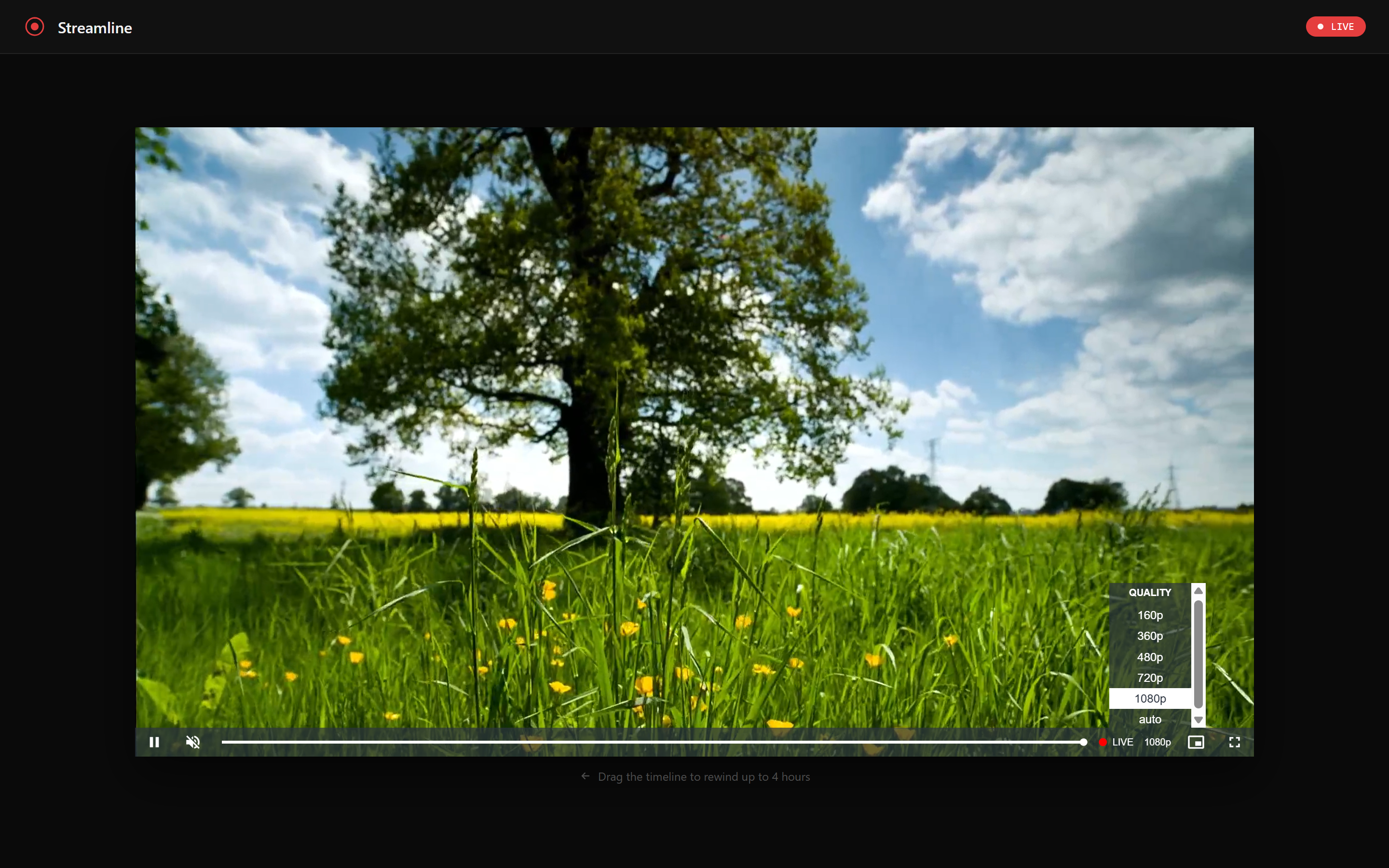
  <img src="/assets/images/streamline/screenshot-player.png" alt="Streamline player with video quality selector" />
  <figcaption>The Streamline player — Video.js with LL-HLS, quality selector, and a DVR scrubber that lets viewers rewind up to four hours.</figcaption>
</figure>

<figure>
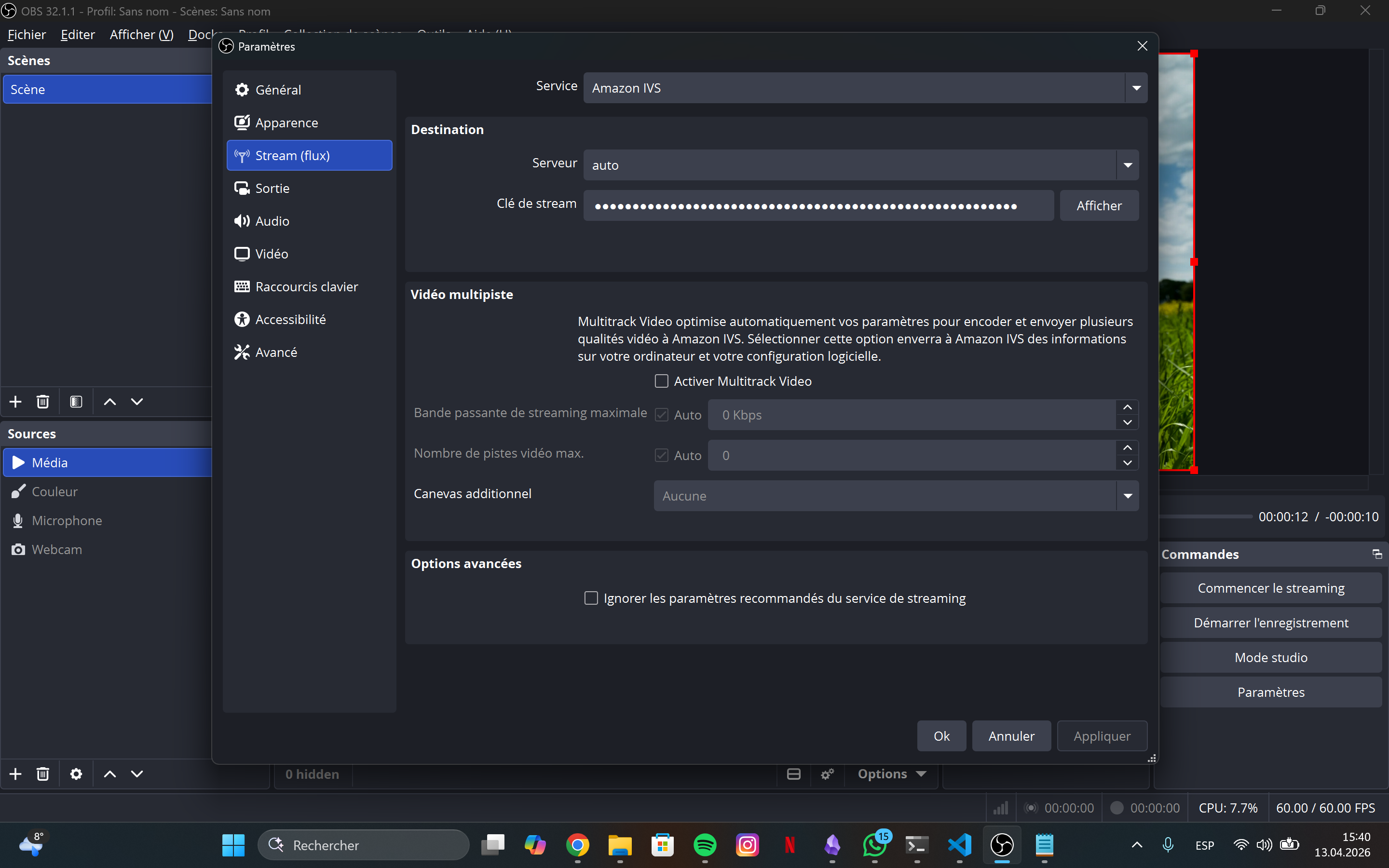
  <img src="/assets/images/streamline/screenshot-obs.png" alt="OBS Studio broadcasting to the Streamline RTMP endpoint" />
  <figcaption>OBS Studio configured with the IVS ingest endpoint and stream key - two fields, then you're live.</figcaption>
</figure>

<hr />

<h2 id="architecture">Architecture</h2>

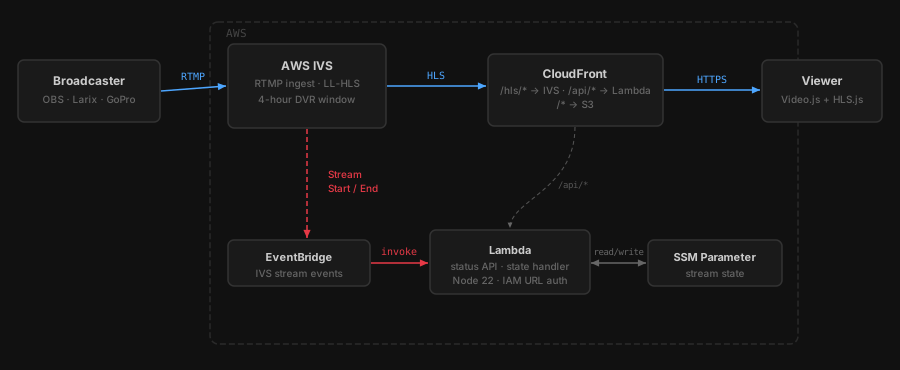
<p>The whole system fits in one diagram. A broadcaster pushes RTMP to IVS. Viewers hit a single CloudFront distribution that fans out to three origins depending on the URL path. A side channel - EventBridge → Lambda → SSM - keeps stream state without any polling.</p>

<p><img src="/assets/images/streamline/architecture.svg" alt="Streamline architecture — broadcaster to viewer via IVS and CloudFront, with EventBridge/Lambda/SSM state side channel" /></p>

<p>There is no media server. There is no recording bucket. IVS handles ingest and transcode entirely on its own infrastructure. CloudFront is the only public surface - the S3 bucket and Lambda function URL both reject requests that don’t come through CloudFront.</p>

<hr />

<h2 id="the-dvr-window">The DVR window</h2>

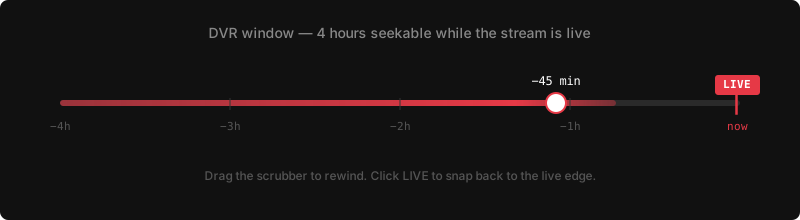
<p>IVS STANDARD channels maintain a rolling 4-hour DVR window internally. There is no <code class="language-plaintext highlighter-rouge">recording_configuration_arn</code>, no S3 bucket, no retention policy. The HLS manifest IVS generates contains the full seekable range. Video.js reads it automatically when you set <code class="language-plaintext highlighter-rouge">liveui: true</code> - no special URL parameters or player configuration required beyond that flag.</p>

<p>While a stream is live, a viewer can drag the progress bar all the way back to hour zero. Clicking the <strong>LIVE</strong> button snaps back to the live edge instantly. When the stream ends, the DVR segments are discarded.</p>

<p><img src="/assets/images/streamline/dvr-timeline.svg" alt="DVR timeline — drag to rewind up to 4 hours, LIVE button snaps back to the edge" /></p>

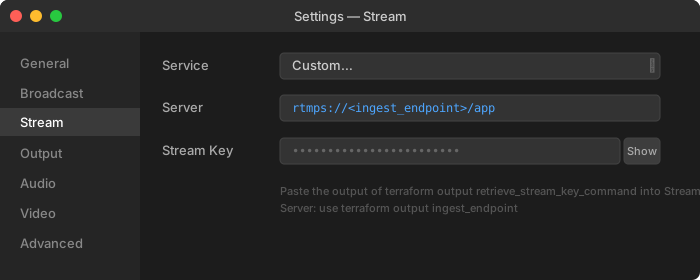
<p>Configuring OBS is a two-field job: paste the <code class="language-plaintext highlighter-rouge">ingest_endpoint</code> and the <code class="language-plaintext highlighter-rouge">stream_key</code> (retrieved from Secrets Manager)</p>

<p><img src="/assets/images/streamline/obs-settings.svg" alt="OBS stream settings — Server and Stream Key fields" /></p>

<hr />

<h2 id="how-request-routing-works">How request routing works</h2>

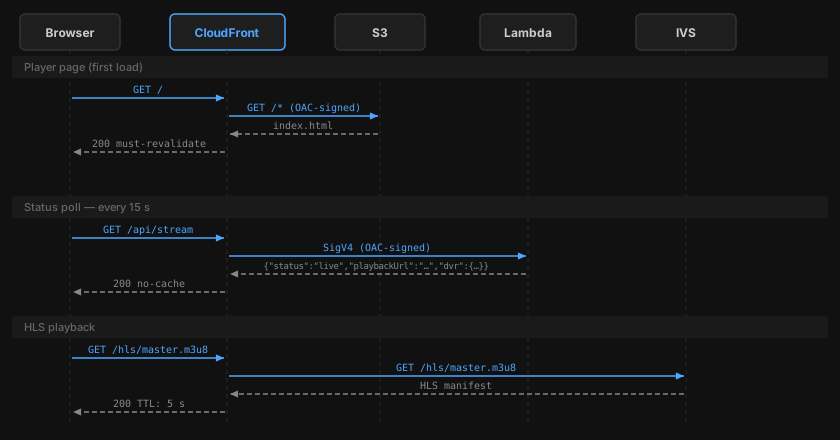
<p>A single CloudFront distribution handles three completely different types of traffic. The path prefix determines which origin receives the request:</p>

<p><img src="/assets/images/streamline/request-routing.svg" alt="Request routing - CloudFront fans out to S3 (player page), Lambda (status API), and IVS (HLS segments) based on path prefix" /></p>

<p>Each origin has its own cache policy:</p>
<ul>
  <li><strong>S3</strong> (<code class="language-plaintext highlighter-rouge">/*</code>): <code class="language-plaintext highlighter-rouge">index.html</code> gets <code class="language-plaintext highlighter-rouge">must-revalidate</code> (always fresh); other assets get <code class="language-plaintext highlighter-rouge">immutable</code> (hash in filename, 1-year TTL)</li>
  <li><strong>Lambda</strong> (<code class="language-plaintext highlighter-rouge">/api/*</code>): <code class="language-plaintext highlighter-rouge">no-cache</code> - the Lambda itself has a 10-second in-memory cache, so CloudFront doesn’t need to</li>
  <li><strong>IVS</strong> (<code class="language-plaintext highlighter-rouge">/hls/*</code>): 5-second TTL - long enough to reduce origin hits, short enough that the live edge stays fresh</li>
</ul>

<hr />

<h2 id="stream-state-eventbridge--ssm-instead-of-polling">Stream state: EventBridge + SSM instead of polling</h2>

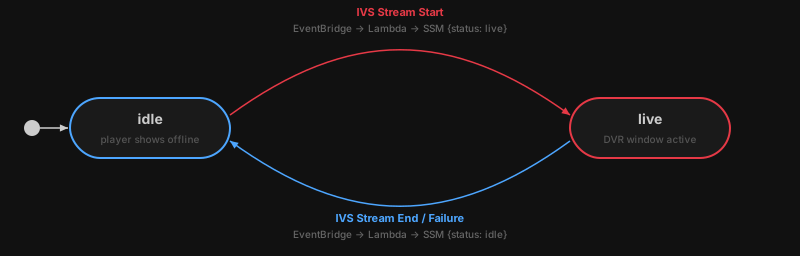
<p>The player needs to know whether a stream is live before it tries to load an HLS manifest. The naive approach - calling IVS <code class="language-plaintext highlighter-rouge">GetStream</code> on every API request - adds unnecessary latency and cost at scale. The approach here is event-driven:</p>

<p><img src="/assets/images/streamline/state-machine.svg" alt="Stream state machine - idle and live states driven by IVS events via EventBridge and Lambda" /></p>

<p>When a broadcaster goes live, IVS fires a <code class="language-plaintext highlighter-rouge">Stream Start</code> event to EventBridge. EventBridge invokes Lambda, which writes <code class="language-plaintext highlighter-rouge">{"status":"live","updatedAt":"..."}</code> to an SSM Parameter. When the stream ends or fails, the same path runs in reverse.</p>

<p>The <code class="language-plaintext highlighter-rouge">/api/stream</code> handler reads this SSM parameter (with a 10-second module-level cache) and returns the current state to the player. The Lambda function never polls IVS directly during normal operation - IVS pushes state changes to it. If the SSM parameter doesn’t exist yet (stream has never been live), <code class="language-plaintext highlighter-rouge">ParameterNotFound</code> is caught and mapped to <code class="language-plaintext highlighter-rouge">idle</code>.</p>

<hr />

<h2 id="security-why-the-lambda-rejects-direct-requests">Security: why the Lambda rejects direct requests</h2>

<p>The Lambda function URL is configured with <code class="language-plaintext highlighter-rouge">authorization_type = "AWS_IAM"</code>. Access is granted exclusively to <code class="language-plaintext highlighter-rouge">cloudfront.amazonaws.com</code> with a condition scoped to this specific distribution’s ARN. CloudFront uses an Origin Access Control (OAC) to sign every request to the Lambda origin with SigV4 before forwarding it.</p>

<p>The practical result: requests arriving at the function URL from any other source - curl, another Lambda, another CloudFront distribution - are rejected by IAM before they reach the function code. The same OAC pattern applies to S3, where the bucket policy blocks all public access and only allows requests signed by this distribution’s OAC.</p>

<hr />

<h2 id="infrastructure-as-code">Infrastructure as code</h2>

<p>Five focused Terraform modules:</p>

<table>
  <thead>
    <tr>
      <th>Module</th>
      <th>Responsibility</th>
    </tr>
  </thead>
  <tbody>
    <tr>
      <td><code class="language-plaintext highlighter-rouge">ivs</code></td>
      <td>IVS channel, stream key, Secrets Manager secret</td>
    </tr>
    <tr>
      <td><code class="language-plaintext highlighter-rouge">s3</code></td>
      <td>Frontend bucket, CloudFront OAC</td>
    </tr>
    <tr>
      <td><code class="language-plaintext highlighter-rouge">lambda</code></td>
      <td>IAM role, SSM parameter, function, alias, function URL, EventBridge rule</td>
    </tr>
    <tr>
      <td><code class="language-plaintext highlighter-rouge">cloudfront</code></td>
      <td>Distribution, three origins, cache behaviours, optional custom domain wiring</td>
    </tr>
    <tr>
      <td><code class="language-plaintext highlighter-rouge">dns</code></td>
      <td>ACM certificate (us-east-1), Route 53 validation records and alias</td>
    </tr>
    <tr>
      <td><code class="language-plaintext highlighter-rouge">monitoring</code></td>
      <td>CloudWatch alarms for Lambda errors/throttles and CloudFront 5xx; SNS topic</td>
    </tr>
  </tbody>
</table>

<p>The S3 bucket policy and the Lambda permission for CloudFront live in the root module. This is intentional: both need values from two different modules (<code class="language-plaintext highlighter-rouge">s3</code>/<code class="language-plaintext highlighter-rouge">cloudfront</code> and <code class="language-plaintext highlighter-rouge">lambda</code>/<code class="language-plaintext highlighter-rouge">cloudfront</code> respectively), and putting them in either child module would create a circular dependency. Wiring them at the root lets Terraform resolve the dependency order in a single apply.</p>

<p>State locking uses Terraform 1.10’s native S3 locking (<code class="language-plaintext highlighter-rouge">use_lockfile = true</code>). No DynamoDB table required.</p>

<hr />

<h2 id="deployment-pipeline">Deployment pipeline</h2>

<p>Every production deploy is triggered by a semver tag:</p>

<div class="language-bash highlighter-rouge"><div class="highlight"><pre class="highlight"><code>git tag v1.0.0 <span class="o">&amp;&amp;</span> git push origin v1.0.0
</code></pre></div></div>

<p>The workflow runs three jobs. <code class="language-plaintext highlighter-rouge">prepare</code> extracts the version and detects which paths changed. <code class="language-plaintext highlighter-rouge">deploy-frontend</code> and <code class="language-plaintext highlighter-rouge">deploy-lambda</code> run in parallel and only execute if their respective paths changed since the previous tag.</p>

<p><code class="language-plaintext highlighter-rouge">deploy-lambda</code> builds the TypeScript source, prunes devDependencies, zips <code class="language-plaintext highlighter-rouge">dist/</code> and <code class="language-plaintext highlighter-rouge">node_modules/</code>, uploads the zip to Lambda, waits for propagation, publishes an immutable version snapshot, and points the <code class="language-plaintext highlighter-rouge">live</code> alias at it. Every Lambda version is immutable — rolling back is a single AWS CLI call:</p>

<div class="language-bash highlighter-rouge"><div class="highlight"><pre class="highlight"><code>aws lambda update-alias <span class="se">\</span>
  <span class="nt">--function-name</span> streamline-prod <span class="se">\</span>
  <span class="nt">--name</span> live <span class="se">\</span>
  <span class="nt">--function-version</span> PREVIOUS_VERSION_NUMBER
</code></pre></div></div>

<p>GitHub Actions authenticates to AWS via OIDC. There are no long-lived AWS credentials stored as secrets.</p>

<hr />

<h2 id="getting-started">Getting started</h2>

<div class="language-bash highlighter-rouge"><div class="highlight"><pre class="highlight"><code>git clone https://github.com/mguarinos/streamline.git
<span class="nb">cd </span>streamline
./scripts/bootstrap.sh          <span class="c"># creates state bucket, OIDC provider, deploy role</span>
<span class="nb">cd </span>terraform
terraform init <span class="nt">-backend-config</span><span class="o">=</span>backend.hcl
terraform apply
terraform output                <span class="c"># note the ingest endpoint and stream key command</span>
</code></pre></div></div>

<p>Full setup instructions are in the <a href="https://github.com/mguarinos/streamline">README</a>.</p>]]></content><author><name>Manuel Guarinos</name></author><category term="aws" /><category term="serverless" /><category term="streaming" /><category term="aws" /><category term="ivs" /><category term="cloudfront" /><category term="lambda" /><category term="terraform" /><summary type="html"><![CDATA[A fully serverless live streaming platform built on AWS IVS, CloudFront, and Lambda — with a built-in 4-hour DVR window, no recording bucket, and a cost near zero at rest.]]></summary><media:thumbnail xmlns:media="http://search.yahoo.com/mrss/" url="https://mguarinos.com/assets/images/streamline/header.svg" /><media:content medium="image" url="https://mguarinos.com/assets/images/streamline/header.svg" xmlns:media="http://search.yahoo.com/mrss/" /></entry></feed>