Ollama from zero: run a local LLM and hit its API
Contents
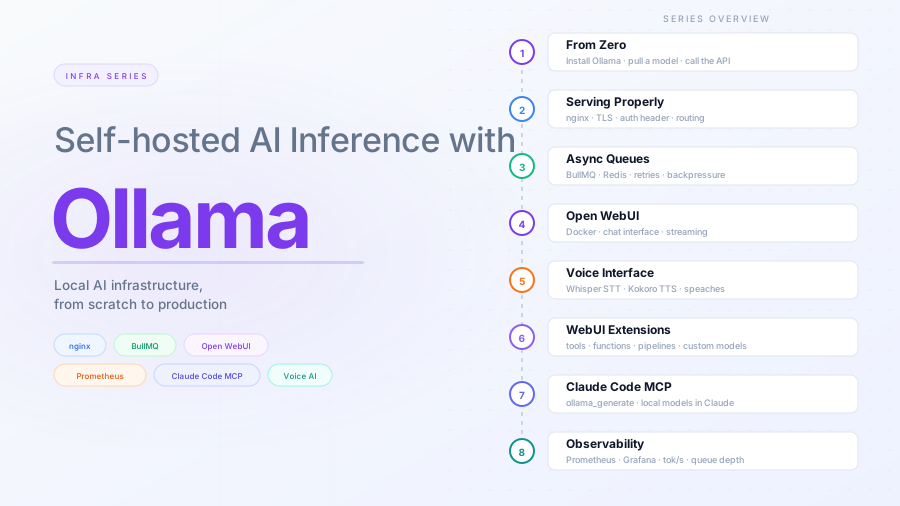
This is part 1 of the Ollama infra series. By the end you will have Ollama running, a model pulled, and the HTTP API responding to requests. Every subsequent post in the series builds on this foundation.
What Ollama is
Ollama is a runtime that manages local language models. It handles downloading model weights, quantization selection, memory mapping, and exposes a local HTTP server with an API that is compatible with a subset of the OpenAI API. You run a model the same way you run a Docker container — pull it by name, run it, stop it.
What it is not: a cloud service, a chat UI, or a fine-tuning tool. It is a local inference server. Everything happens on your machine.
Hardware requirements
Ollama runs on Linux, macOS, and Windows. GPU acceleration is optional but strongly recommended for anything above 3B parameters.
| Setup | What works well |
|---|---|
| CPU only | 1B–3B models at low throughput |
| 8 GB VRAM (consumer GPU) | 7B models at comfortable speed |
| 16 GB VRAM | 13B models, or 7B with headroom |
| 24 GB+ VRAM | 30B+ models |
For this series, any machine with 8 GB RAM can follow along using a 3B model.
VRAM, RAM, and how models load
Your computer has two kinds of memory:
- RAM — system memory the CPU reads from. Fast enough for general computation, typically 16–64 GB on a desktop.
- VRAM — memory physically on the GPU chip. The GPU can only run math on data already in VRAM. Much higher bandwidth than RAM for the kind of parallel operations a GPU does. Typically 4–24 GB on a consumer card.
When you run a model, Ollama loads the weights from disk into memory. If the model fits in VRAM, the GPU handles all inference — fast. If it does not fit, Ollama offloads layers to RAM — slower.
You can see how a loaded model is placed in memory with:
$ ollama ps
NAME           ID              SIZE      PROCESSOR    CONTEXT    UNTIL
llama3.2:3b    a80c4f17acd5    2.5 GB    100% CPU     4096       4 minutes from now
100% GPU means fully in VRAM. 50% GPU / 50% CPU means it partially spilled to RAM. In this case, it’s fully in RAM.
Quantization
A language model is a large list of numbers — the weights. A 7B model has 7 billion of them. At full precision each number takes 4 bytes: 7B × 4 bytes = 28 GB. That is too large for most hardware.
Quantization is lossy compression applied to those weights. Instead of storing each weight as a precise 32-bit float, you store an approximation using fewer bits:
| Format | Bits per weight | 7B model size | Quality loss |
|---|---|---|---|
| F32 | 32 | ~28 GB | none (baseline) |
| F16 | 16 | ~14 GB | negligible |
| Q8_0 | 8 | ~7 GB | very small |
| Q4_K_M | 4 | ~4.5 GB | small, usually acceptable |
| Q2_K | 2 | ~2.5 GB | noticeable |
Ollama defaults to Q4_K_M when you pull a model without specifying a tag. It is the practical sweet spot — roughly half the size of Q8, with quality that is hard to distinguish for most tasks. The tag you pull determines the quantization: llama3.2:3b gets the default, llama3.2:3b-instruct-q8_0 gets Q8.
The rule of thumb: ~0.6 GB of VRAM per billion parameters at Q4_K_M. A 7B model needs ~4.5 GB, an 11B model needs ~7 GB, a 3B model needs ~2 GB.
Tags follow the pattern name:size-variant-quantization. Some examples:
| Tag | What it is |
|---|---|
llama3.2:3b |
Default 3B, Q4_K_M quantization |
llama3.2:3b-instruct-q8_0 |
3B instruct-tuned, Q8 quantization |
llama3.2-vision:11b |
11B multimodal model (text + images) |
codellama:7b |
7B model trained on code |
nomic-embed-text |
Embedding model, not for generation |
Not all models are for chat or generation. Embedding models (used for semantic search and RAG) are also in the registry — they have a different API endpoint (/api/embeddings) and do not respond to /api/generate.
Installing Ollama
Linux:
curl -fsSL https://ollama.com/install.sh | sh
The installer places the binary at /usr/local/bin/ollama and registers a systemd service that starts on boot. The service runs as the ollama user created during installation.
Verify:
ollama --version
macOS:
Download the app from ollama.com and drag it to Applications. The menu bar icon indicates when Ollama is running.
Windows:
Download the installer from ollama.com. It installs a background service.
Finding models
Ollama’s model registry is at ollama.com/library. Every model page shows available tags, parameter counts, quantization variants, and download size. Check the page before pulling — it tells you the VRAM requirement and whether the model supports tools or vision.
Once a model is pulled, you can inspect its details locally:
$ ollama show llama3.2:3b
  Model
    architecture        llama
    parameters          3.2B
    context length      131072
    embedding length    3072
    quantization        Q4_K_M

  Capabilities
    completion
    tools

  Parameters
    stop    "<|start_header_id|>"
    stop    "<|end_header_id|>"
    stop    "<|eot_id|>"
Context length
The context length in ollama show is the maximum number of tokens the model was trained on — llama3.2:3b reports 131072. That is not what Ollama allocates by default.
Ollama’s default context window depends on available VRAM: 4k for machines with less than 24 GiB, scaling up from there. To override it, set the environment variable before starting the server:
OLLAMA_CONTEXT_LENGTH=32768 ollama serve
For a persistent systemd setup, add it to the service’s environment:
systemctl edit ollama
[Service]
Environment="OLLAMA_CONTEXT_LENGTH=32768"
A larger context window requires more VRAM — the KV cache grows linearly with context size. If the model no longer fits in VRAM after increasing it, Ollama offloads layers to RAM and generation slows noticeably. Verify what is actually allocated after restarting:
ollama ps
# NAME           ...  CONTEXT
# llama3.2:3b    ...  32768
For detailed guidance see the Ollama context length documentation.
Pulling and running a model
Ollama uses a model registry at ollama.com/library. Pull a model by name:
# A capable 3B model — fits in 2 GB of VRAM or 4 GB of RAM
ollama pull llama3.2:3b
Once downloaded, run an interactive session:
ollama run llama3.2:3b
Type a prompt and press Enter. Type /bye to exit.
To list what you have pulled:
ollama list
To remove a model:
ollama rm llama3.2:3b
The HTTP API
When Ollama is running (either as a service or via ollama serve), it listens on port 11434 by default. You do not need to do anything extra — the service started during installation is already running.
Check it:
curl http://localhost:11434
# Ollama is running
Generate endpoint
The core endpoint is /api/generate. It accepts a model name and a prompt, and streams back tokens:
curl http://localhost:11434/api/generate -s \
  -d '{
    "model": "llama3.2:3b",
    "prompt": "What is a reverse proxy?",
    "stream": false
  }' | jq
With stream: false you get a single JSON response. With stream: true (the default), you get newline-delimited JSON objects, one per token.
The response:
{
  "model": "llama3.2:3b",
  "created_at": "2026-04-21T09:17:16.256470627Z",
  "response": "A reverse proxy is a server that acts as an intermediary between...",
  "done": true,
  "done_reason": "stop",
  "context": [...],
  "total_duration": 34746343448,
  "load_duration": 298291517,
  "prompt_eval_count": 31,
  "prompt_eval_duration": 352002710,
  "eval_count": 432,
  "eval_duration": 33600883965
}
total_duration is in nanoseconds. eval_count is tokens generated. These fields matter later when we add observability.
Chat endpoint
The /api/chat endpoint follows the OpenAI messages format:
curl http://localhost:11434/api/chat \
  -d '{
    "model": "llama3.2:3b",
    "messages": [
      { "role": "user", "content": "Explain nginx in one paragraph." }
    ],
    "stream": false
  }'
OpenAI-compatible endpoint
Ollama also exposes /v1/chat/completions, which is compatible with the OpenAI client spec. Any tool that accepts a custom base URL and an API key (you can pass any string) can point at Ollama directly:
curl http://localhost:11434/v1/chat/completions \
  -H "Authorization: Bearer ignored" \
  -d '{
    "model": "llama3.2:3b",
    "messages": [{ "role": "user", "content": "Hello" }]
  }'
This compatibility layer is what makes it easy to swap Ollama in for existing tools — something we use in post 7 with Claude Code.
Calling from code
Python
import httpx

response = httpx.post(
    "http://localhost:11434/api/generate",
    json={"model": "llama3.2:3b", "prompt": "What is DNS?", "stream": False},
    timeout=60.0,
)
print(response.json()["response"])
Or using the ollama Python package:
pip install ollama
import ollama

response = ollama.generate(model="llama3.2:3b", prompt="What is DNS?")
print(response["response"])
Node.js
npm install ollama
const ollama = require("ollama");

ollama.generate({
  model: "llama3.2:3b",
  prompt: "What is DNS?",
}).then((response) => console.log(response.response));
Checking service status
# Is the service running?
$ systemctl status ollama
● ollama.service - Ollama Service
     Loaded: loaded (/etc/systemd/system/ollama.service; enabled; preset: enabled)
     Active: active (running) since Mon 2026-04-20 17:51:10 CEST; 17h ago
   Main PID: 3473 (ollama)
      Tasks: 29 (limit: 7108)
     Memory: 3.6G ()
     CGroup: /system.slice/ollama.service
             ├─  3473 /usr/local/bin/ollama serve
             └─102649 /usr/local/bin/ollama runner --model /usr/share/ollama/.ollama/models/blobs/sha256-dde5aa3fc5ffc17176b5e8bdc82f587b24b2678c6c>

Apr 21 11:15:51 mguarinos ollama[3473]: [GIN] 2026/04/21 - 11:15:51 | 200 |  7.204189099s |       127.0.0.1 | POST     "/api/generate"
Apr 21 11:16:23 mguarinos ollama[3473]: [GIN] 2026/04/21 - 11:16:23 | 200 | 30.295522344s |       127.0.0.1 | POST     "/api/generate"
Apr 21 11:16:32 mguarinos ollama[3473]: [GIN] 2026/04/21 - 11:16:32 | 500 |   1.76122077s |       127.0.0.1 | POST     "/api/generate"
Apr 21 11:17:16 mguarinos ollama[3473]: [GIN] 2026/04/21 - 11:17:16 | 200 | 35.029927984s |       127.0.0.1 | POST     "/api/generate"
Apr 21 11:18:15 mguarinos ollama[3473]: [GIN] 2026/04/21 - 11:18:15 | 200 | 32.624924588s |       127.0.0.1 | POST     "/api/generate"
Apr 21 11:18:51 mguarinos ollama[3473]: [GIN] 2026/04/21 - 11:18:51 | 200 | 12.967860968s |       127.0.0.1 | POST     "/api/chat"
Apr 21 11:19:10 mguarinos ollama[3473]: [GIN] 2026/04/21 - 11:19:10 | 200 |  2.623931704s |       127.0.0.1 | POST     "/v1/chat/completions"
Apr 21 11:19:28 mguarinos ollama[3473]: [GIN] 2026/04/21 - 11:19:28 | 200 |  9.945051648s |       127.0.0.1 | POST     "/api/chat"
Apr 21 11:19:54 mguarinos ollama[3473]: [GIN] 2026/04/21 - 11:19:54 | 500 |  5.003496873s |       127.0.0.1 | POST     "/api/generate"
Apr 21 11:20:49 mguarinos ollama[3473]: [GIN] 2026/04/21 - 11:20:49 | 200 | 31.820382643s |       127.0.0.1 | POST     "/api/generate"
# What is using port 11434?
$ ss -tlnp | grep 11434
LISTEN 0      4096           0.0.0.0:11434      0.0.0.0:*
# Recent logs
$ journalctl -u ollama -n 50
Apr 21 11:15:46 mguarinos ollama[3473]: print_info: max token length = 256
Apr 21 11:15:46 mguarinos ollama[3473]: load_tensors: loading model tensors, this can take a while... (mmap = false)
Apr 21 11:15:46 mguarinos ollama[3473]: load_tensors:          CPU model buffer size =  1918.35 MiB
Apr 21 11:15:50 mguarinos ollama[3473]: llama_context: constructing llama_context
Apr 21 11:15:50 mguarinos ollama[3473]: llama_context: n_seq_max     = 1
Apr 21 11:15:50 mguarinos ollama[3473]: llama_context: n_ctx         = 4096
Apr 21 11:15:50 mguarinos ollama[3473]: llama_context: n_ctx_seq     = 4096
Apr 21 11:15:50 mguarinos ollama[3473]: llama_context: n_batch       = 512
Apr 21 11:15:50 mguarinos ollama[3473]: llama_context: n_ubatch      = 512
Apr 21 11:15:50 mguarinos ollama[3473]: llama_context: causal_attn   = 1
Apr 21 11:15:50 mguarinos ollama[3473]: llama_context: flash_attn    = auto
Apr 21 11:15:50 mguarinos ollama[3473]: llama_context: kv_unified    = false
Apr 21 11:15:50 mguarinos ollama[3473]: llama_context: freq_base     = 500000.0
Apr 21 11:15:50 mguarinos ollama[3473]: llama_context: freq_scale    = 1
Apr 21 11:15:50 mguarinos ollama[3473]: llama_context: n_ctx_seq (4096) < n_ctx_train (131072) -- the full capacity of the model will not be utiliz>
Apr 21 11:15:50 mguarinos ollama[3473]: llama_context:        CPU  output buffer size =     0.50 MiB
Apr 21 11:15:50 mguarinos ollama[3473]: llama_kv_cache:        CPU KV buffer size =   448.00 MiB
Apr 21 11:15:51 mguarinos ollama[3473]: llama_kv_cache: size =  448.00 MiB (  4096 cells,  28 layers,  1/1 seqs), K (f16):  224.00 MiB, V (f16):  2>
Apr 21 11:15:51 mguarinos ollama[3473]: llama_context: Flash Attention was auto, set to enabled
Apr 21 11:15:51 mguarinos ollama[3473]: llama_context:        CPU compute buffer size =   256.50 MiB
Apr 21 11:15:51 mguarinos ollama[3473]: llama_context: graph nodes  = 875
Apr 21 11:15:51 mguarinos ollama[3473]: llama_context: graph splits = 1
Apr 21 11:15:51 mguarinos ollama[3473]: time=2026-04-21T11:15:51.845+02:00 level=INFO source=server.go:1402 msg="llama runner started in 6.23 secon>
Apr 21 11:15:51 mguarinos ollama[3473]: time=2026-04-21T11:15:51.854+02:00 level=INFO source=sched.go:561 msg="loaded runners" count=1
Apr 21 11:15:51 mguarinos ollama[3473]: time=2026-04-21T11:15:51.856+02:00 level=INFO source=server.go:1364 msg="waiting for llama runner to start >
Apr 21 11:15:51 mguarinos ollama[3473]: time=2026-04-21T11:15:51.872+02:00 level=INFO source=server.go:1402 msg="llama runner started in 6.26 secon>
What you have now
- Ollama installed and running as a systemd service
- A model pulled and tested interactively
- The HTTP API responding on port 11434
- A working
/api/generate,/api/chat, and/v1/chat/completionsendpoint