GitOps with Argo CD: RBAC, ApplicationSets, app-of-apps, and progressive delivery
Contents
Most teams adopt Argo CD by pointing one Application at one Git repo and watching it sync. That works for a single app. It falls apart the moment you have ten services across three environments, a security team that wants to know who can deploy to production, and a release process that needs to be safer than “merge and pray.”
This post is about the second phase: running Argo CD as the control plane for a fleet, not a toy. It covers the mental model, the Application and AppProject resources, RBAC, the two patterns for managing many applications (app-of-apps and ApplicationSet), the long-running argument about branches versus directories for environments, and finally progressive delivery — canary releases gated on Prometheus metrics with automatic rollback, using Argo Rollouts.
What GitOps actually is
GitOps is a deployment model with two non-negotiable properties:
- Git is the single source of truth. The desired state of the cluster lives in a repository as declarative manifests. Nothing is applied by hand.
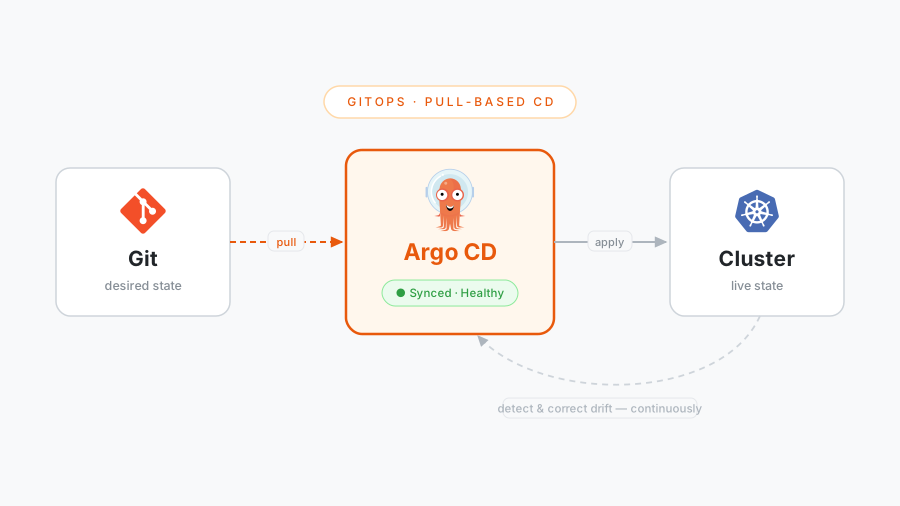
- An agent inside the cluster continuously reconciles live state toward that desired state. It pulls from Git rather than having a pipeline push into the cluster.
The traditional CI/CD model has a pipeline that runs kubectl apply (or helm upgrade) against the cluster. The pipeline holds cluster credentials, deployment is a fire-and-forget event, and nothing notices when someone runs kubectl edit at 2am during an incident.
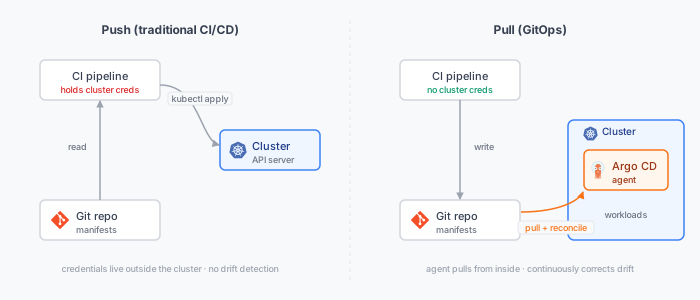
The pull model inverts this. Credentials never leave the cluster — the CI pipeline only ever writes to Git, which means a compromised pipeline cannot touch production directly. And because reconciliation is a loop, not an event, drift gets corrected automatically: the manual 2am edit is reverted on the next sync, and the divergence is visible in the UI until it is. You do not have to watch the UI for it, either — Argo CD’s notifications controller can fire a Slack (or Teams, email, webhook) message the moment an app goes OutOfSync, so drift pages you instead of waiting to be noticed.
This is the same reconciliation pattern Kubernetes controllers use internally — if you want the controller-level mental model, I wrote about it in the Kubernetes operator pattern. Argo CD is, in effect, a controller whose desired state happens to live in Git.
Argo CD in one picture
Argo CD runs as a few components in your cluster (the architecture docs lay out how they fit together):
- application-controller — the reconciliation engine. It compares the desired manifests (rendered from Git) against live cluster state and reports
Synced/OutOfSyncandHealthy/Degraded. - repo-server — clones Git repositories and renders manifests (runs
kustomize build,helm template, plain YAML, or a config-management plugin). - server (API/UI) — the API behind the web UI, CLI, and gRPC. This is where authentication and RBAC live.
- redis — a cache, not a datastore. All persistent state is in Git and in Kubernetes resources.
- applicationset-controller — generates
Applicationresources from templates (more on this below).
The Application resource
The Application is the atom of Argo CD. It answers three questions: what to deploy (source), where to deploy it (destination), and how to keep it in sync (sync policy).
apiVersion: argoproj.io/v1alpha1
kind: Application
metadata:
  name: payments-prod
  namespace: argocd
  finalizers:
    - resources-finalizer.argocd.argoproj.io   # cascade-delete children on app deletion
spec:
  project: payments                            # which AppProject governs this app
  source:
    repoURL: https://github.com/acme/payments-config.git
    targetRevision: main                       # branch, tag, or commit SHA
    path: overlays/prod                         # a directory, not a branch — see below
  destination:
    server: https://kubernetes.default.svc      # in-cluster; or a registered remote cluster
    namespace: payments
  syncPolicy:
    automated:
      prune: true                               # delete resources removed from Git
      selfHeal: true                            # revert manual changes to live state
    syncOptions:
      - CreateNamespace=true
      - PrunePropagationPolicy=foreground
    retry:
      limit: 5
      backoff:
        duration: 5s
        factor: 2
        maxDuration: 3m
A few of these fields are worth dwelling on, because the defaults are not what you want in production:
automated.selfHeal: true is what turns “GitOps” from a deployment convenience into a drift-correction guarantee. Without it, a manual kubectl edit sticks around until the next Git change triggers a sync. With it, the controller reverts the drift within its reconciliation interval (default ~3 minutes, or instantly via a webhook). Turn it on. The whole point of GitOps is that Git wins.
automated.prune: true lets Argo CD delete resources that you removed from Git. It is off by default because it is dangerous — a bad refactor that accidentally drops a Service from the rendered output will delete that Service. Turn it on, but pair it with the finalizers entry above and with PR review, so deletions are deliberate.
Sync waves and hooks. When a single app contains resources with ordering dependencies (a CRD before the custom resource that uses it, a database migration Job before the new Deployment), annotate them:
metadata:
  annotations:
    argocd.argoproj.io/sync-wave: "1"          # lower waves apply first
    # or, for jobs that must run at a specific phase:
    argocd.argoproj.io/hook: PreSync           # PreSync | Sync | PostSync | SyncFail
    argocd.argoproj.io/hook-delete-policy: HookSucceeded
Sync waves give you deterministic ordering within an app without splitting it into many apps.
Projects and RBAC
Out of the box, every Application belongs to the default AppProject, which permits deploying anything from any repo to any cluster and namespace. That is fine for a personal cluster and unacceptable for a shared one. AppProject is your blast-radius boundary.
An AppProject constrains, for the apps inside it: which repos they may pull from, which cluster/namespace destinations they may write to, and which resource kinds they may create.
apiVersion: argoproj.io/v1alpha1
kind: AppProject
metadata:
  name: payments
  namespace: argocd
spec:
  description: Payments team applications
  sourceRepos:
    - https://github.com/acme/payments-config.git   # only this team's repo
  destinations:
    - server: https://kubernetes.default.svc
      namespace: payments-*                          # only their namespaces
  clusterResourceWhitelist: []                        # no cluster-scoped resources at all
  namespaceResourceBlacklist:
    - group: ""
      kind: ResourceQuota                             # team can't widen its own quota
  roles:
    - name: deployer
      description: Can sync payments apps but not edit their definitions
      policies:
        - p, proj:payments:deployer, applications, sync, payments/*, allow
        - p, proj:payments:deployer, applications, get,  payments/*, allow
      groups:
        - acme:payments-engineers                     # bound to an SSO group
That clusterResourceWhitelist: [] line is one of the highest-leverage settings in Argo CD: it means apps in the payments project physically cannot create ClusterRoles, ClusterRoleBindings, or anything else cluster-scoped, regardless of what someone commits. Privilege escalation through a merged manifest stops being possible.
Global RBAC
Project roles handle what a project’s apps can do. Argo CD’s global RBAC handles what a human or token can do in the Argo CD API. It is a CSV policy, usually in the argocd-rbac-cm ConfigMap:
# role definitions: p, <subject>, <resource>, <action>, <object>, <effect>
p, role:dev,     applications, get,    */*,            allow
p, role:dev,     applications, sync,   */dev-*,        allow      # devs sync dev apps only
p, role:release, applications, sync,   payments/*,     allow
p, role:release, applications, action/*, payments/*,   allow      # run resource actions (e.g. restart)

# group -> role bindings (groups come from your SSO provider)
g, acme:developers,       role:dev
g, acme:payments-release, role:release
Two rules make this safe in practice:
- Set
policy.default: role:''(empty) so the implicit default is deny. Anything not explicitly allowed is forbidden. - Bind roles to SSO groups, never to individuals. Wire Argo CD to your IdP via OIDC or SAML (
dexships with it for OIDC federation). Then access is managed where it belongs — in your identity provider — and offboarding someone is a single action there, not a hunt through CSV files. Local accounts should exist only for break-glass.
The combination — AppProject for blast radius, global RBAC for human access, SSO groups for identity — is what lets you hand Argo CD to thirty engineers without lying awake about it.
ApplicationSet: one template, many targets
You rarely deploy one app to one place. You deploy the same app to dev, staging, and prod; or one app to twenty regional clusters; or twenty microservices that all follow the same layout. Hand-writing an Application per combination is how config rot starts.
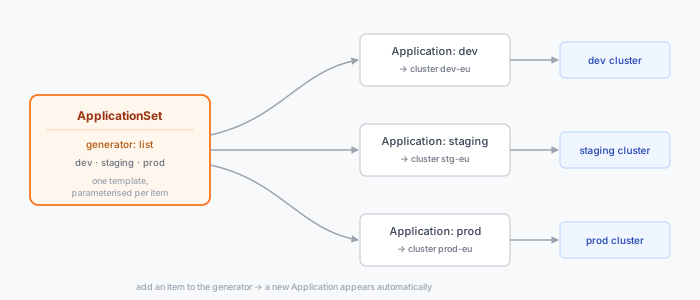
ApplicationSet is a controller that generates Application resources from a template plus a generator that produces parameters.
apiVersion: argoproj.io/v1alpha1
kind: ApplicationSet
metadata:
  name: payments
  namespace: argocd
spec:
  goTemplate: true
  generators:
    - list:
        elements:
          - env: dev
            cluster: https://dev.k8s.acme.internal
          - env: staging
            cluster: https://stg.k8s.acme.internal
          - env: prod
            cluster: https://prod.k8s.acme.internal
  template:
    metadata:
      name: 'payments-{{.env}}'
    spec:
      project: payments
      source:
        repoURL: https://github.com/acme/payments-config.git
        targetRevision: main
        path: 'overlays/{{.env}}'
      destination:
        server: '{{.cluster}}'
        namespace: payments
      syncPolicy:
        automated: { prune: true, selfHeal: true }
Add a fourth environment by appending one element; the controller materialises a new Application automatically. The generators that matter most:
| Generator | Produces one Application per… | Use it for |
|---|---|---|
| List | hard-coded element | a small, explicit set of environments |
| Cluster | cluster registered in Argo CD | rolling the same app out to every cluster (label-selectable) |
| Git (directories) | directory matching a path glob | “every folder under apps/ is an app” — self-service onboarding |
| Git (files) | config file matching a glob | per-app config files that carry their own parameters |
| Matrix | cartesian product of two generators | every app × every cluster |
| Pull Request | open PR in a repo | ephemeral preview environments per PR |
The Git-directory generator is the one that unlocks self-service: a team adds a directory to the repo, opens a PR, and once merged their app exists — no Argo CD admin in the loop.
App-of-apps: bootstrapping the rest
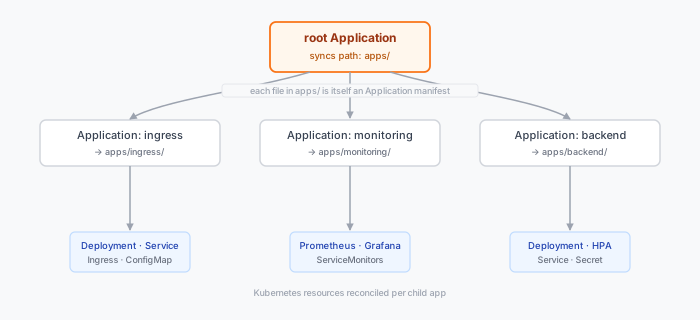
ApplicationSet solves “the same app in many places.” The older app-of-apps pattern solves a different problem: “a single thing I can apply to bootstrap an entire cluster’s worth of different apps.”
The idea is simple. You create one root Application whose source is a directory full of other Application manifests. Argo CD syncs the root, which creates the children, which sync their own workloads.
# root app — the only thing you apply by hand on a fresh cluster
apiVersion: argoproj.io/v1alpha1
kind: Application
metadata:
  name: bootstrap
  namespace: argocd
spec:
  project: platform
  source:
    repoURL: https://github.com/acme/cluster-config.git
    targetRevision: main
    path: apps                 # this dir contains ingress.yaml, monitoring.yaml, ...
  destination:
    server: https://kubernetes.default.svc
    namespace: argocd
  syncPolicy:
    automated: { prune: true, selfHeal: true }
kubectl apply -f bootstrap.yaml once, and the entire platform layer — ingress controller, monitoring stack, cert-manager, the lot — installs and stays reconciled. Rebuilding a cluster becomes: create the cluster, apply one manifest, wait.
App-of-apps vs ApplicationSet — which one? They overlap, and the honest answer is that ApplicationSet has largely superseded app-of-apps for the fan-out case. Use this split:
ApplicationSetwhen the children are homogeneous — the same app templated across environments or clusters. The generator model is purpose-built for it and you get add-by-config-line ergonomics.- App-of-apps when the children are heterogeneous and few — a curated bootstrap list where each child is genuinely different and you want them spelled out explicitly. It is also the simplest possible “install everything” entry point, with no extra controller concepts.
A common, clean setup uses both: one app-of-apps root that bootstraps the platform, and ApplicationSet for the homogeneous workload tiers underneath it.
Branches vs directories for environments
Here is the question every team argues about: how do you represent dev/staging/prod in Git? There are two camps.
Branch per environment: a dev branch, a staging branch, a prod branch, each holding a full copy of the manifests. You “promote” by merging dev → staging → prod.
Directory per environment: a single branch (main), with overlays/dev, overlays/staging, overlays/prod directories layering environment-specific values over a shared base. You promote by editing a value in the next environment’s directory.
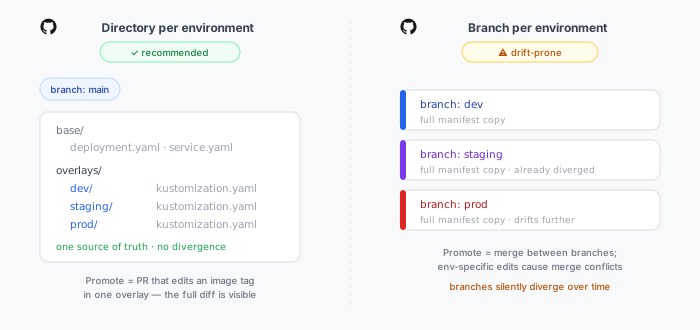
Use directories. Avoid branches per environment. This is the prevailing recommendation from the Argo and broader CNCF community, and the reasoning holds up:
- Branches drift. Long-lived environment branches accumulate divergent history. An urgent fix cherry-picked into
prodbut not merged back, an env-specific tweak made onstaging— and now your branches are subtly different in ways no one fully tracks. Directories make every environment’s config visible side by side in one commit. Drift becomes a diff, not an archaeology project. - Merge conflicts are structural, not accidental. With branches, the very things that should differ between environments (replica counts, resource limits, hostnames) cause merge conflicts every time you promote, because merging tries to make the branches identical. Directories invert this: shared config lives once in
base, and only the genuine differences live in each overlay. - Promotion is an honest, reviewable diff. Promoting a release becomes a PR that changes
image: payments:v2.3.1inoverlays/prod/kustomization.yaml. The reviewer sees exactly what changes in production — one line — instead of a merge that bundles whatever else drifted between branches.
A typical Kustomize layout:
payments-config/
├── base/
│   ├── deployment.yaml
│   ├── service.yaml
│   └── kustomization.yaml
└── overlays/
    ├── dev/
    │   └── kustomization.yaml      # patches: 1 replica, debug logging, dev hostname
    ├── staging/
    │   └── kustomization.yaml      # patches: 2 replicas, staging hostname
    └── prod/
        └── kustomization.yaml      # patches: 6 replicas, prod hostname, image tag
# overlays/prod/kustomization.yaml
apiVersion: kustomize.config.k8s.io/v1beta1
kind: Kustomization
namespace: payments
resources:
  - ../../base
images:
  - name: acme/payments
    newTag: v2.3.1                  # promotion = bumping this line via PR
replicas:
  - name: payments
    count: 6
The one legitimate use of branches here is targetRevision pinning for rollback: prod can point at a tag or a specific SHA rather than a moving main, so you control exactly when it picks up changes. That is pinning a revision, not maintaining a parallel environment branch — a different thing entirely.
Helm users get the same separation with a shared chart plus per-environment
values-<env>.yamlfiles referenced from eachApplication. The principle is identical: one source of truth, environment differences expressed as thin overlays, never as divergent branches.
Progressive delivery with Argo Rollouts
Argo CD will faithfully sync image: payments:v2.3.1 to production and mark the app Healthy the moment the pods pass their readiness probe. But “the pods started” is not “the release is good.” A new version can start cleanly and still return 5xx on a code path readiness never exercises, or quietly double its p99 latency.
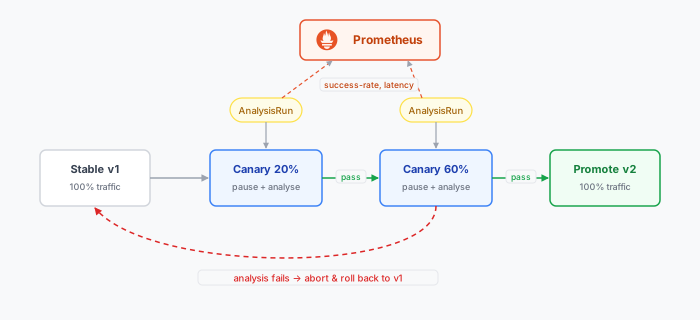
A standard Deployment gives you RollingUpdate, which shifts traffic based purely on pod readiness — it has no concept of “is the new version actually behaving.” Argo Rollouts replaces the Deployment with a Rollout resource that adds metric-gated progressive delivery: it shifts a small slice of traffic to the new version, queries Prometheus to ask whether that slice is healthy, and only proceeds if the metrics say yes — otherwise it rolls back automatically.
The Rollout
A Rollout is a drop-in replacement for a Deployment — same pod spec — with a strategy.canary block describing the steps:
apiVersion: argoproj.io/v1alpha1
kind: Rollout
metadata:
  name: payments
spec:
  replicas: 6
  selector:
    matchLabels: { app: payments }
  template:
    metadata:
      labels: { app: payments }
    spec:
      containers:
        - name: payments
          image: acme/payments:v2.3.1
  strategy:
    canary:
      analysis:
        templates:
          - templateName: success-rate
        startingStep: 1                  # begin analysing after the first traffic shift
      steps:
        - setWeight: 20                  # 20% of traffic to the canary
        - pause: { duration: 5m }        # bake while analysis runs
        - setWeight: 60
        - pause: { duration: 5m }
        - setWeight: 100                 # full promotion
The analysis
The AnalysisTemplate is where Prometheus comes in. It defines a metric, a query, and a success condition. The rollout runs it (an AnalysisRun) during the canary and aborts if it fails:
apiVersion: argoproj.io/v1alpha1
kind: AnalysisTemplate
metadata:
  name: success-rate
spec:
  metrics:
    - name: success-rate
      interval: 1m
      successCondition: result[0] >= 0.99      # ≥99% of requests non-5xx
      failureLimit: 2                            # abort after 2 failed measurements
      provider:
        prometheus:
          address: http://prometheus.monitoring.svc:9090
          query: |
            sum(rate(
              http_requests_total{app="payments",code!~"5.."}[2m]
            ))
            /
            sum(rate(
              http_requests_total{app="payments"}[2m]
            ))
The query is a classic RED-style success ratio: non-5xx requests over total requests, for the canary. If it drops below 99% for two consecutive measurements, the AnalysisRun fails, the rollout aborts, and traffic snaps back to the stable version automatically — no human paged, no manual kubectl rollout undo. If the metrics stay healthy through every step, the canary is promoted to stable.
Prometheus is only one of the metric providers Argo Rollouts supports. If your signal lives somewhere else, the same AnalysisTemplate machinery still applies — only the provider block changes:
web— make an arbitrary HTTP request and assert on the JSON response. Useful for gating on an internal health/score endpoint, a feature-flag service, or any system that already exposes a verdict over HTTP.job— run a KubernetesJoband treat its exit code as pass/fail. This is the escape hatch for anything: a smoke-test suite, a synthetic transaction, acurl-and-grep script. Exit 0 passes, non-zero fails.- Hosted observability — first-class providers for Datadog, New Relic, CloudWatch, Graphite, and others, so you can gate on the same dashboards your team already watches.
You can also list several metrics in one template — for example a Prometheus success-rate and a web check against a downstream — and the rollout only advances when all of them pass.
This is the payoff of having built real observability first. If you have not defined what “healthy” means for your service in metric terms — success rate, latency percentiles, saturation — you have nothing to gate a rollout on. The four golden signals and RED method I covered in the observability series are exactly the inputs an AnalysisTemplate consumes, and the same metrics behind the burn-rate SLO alerts from that series make natural canary gates; progressive delivery is where SLO thinking stops being a dashboard and starts being a release gate.
Run analysis on metrics you would actually page on. A canary gated on a metric that does not reflect user pain (CPU usage, say) gives false confidence. Gate on the success rate and latency your SLOs are written against, querying only the canary’s traffic via a
version/pod-template-hashlabel so the stable pods don’t mask a bad canary.
A sane default setup
Pulling the threads together, here is a setup that scales from one team to many without rework:
- One Git repo per team for app config, plus a central platform repo for cluster-wide concerns. Both use directory-per-environment overlays — never environment branches.
- An app-of-apps root per cluster that bootstraps the platform layer. Applying one manifest rebuilds a cluster’s foundation from scratch.
ApplicationSetfor the homogeneous workload tiers — one per app, fanning out across environments or clusters via a generator. New environment = one config line.- One
AppProjectper team, withclusterResourceWhitelist: []for app projects so a merged manifest can never create cluster-scoped resources, and source/destination restrictions scoping each team to its own repos and namespaces. - Global RBAC bound to SSO groups, with
policy.default: role:''so the baseline is deny. Local accounts only for break-glass. selfHealandpruneon everywhere, so Git genuinely wins and drift self-corrects.- Argo Rollouts for anything user-facing, with canary steps gated on a Prometheus
AnalysisTemplatequerying the same success-rate and latency metrics your SLOs are written against — so a bad release rolls itself back before it burns the error budget.