GitHub Actions to AWS without stored credentials: OIDC role federation
Contents
The default way people wire up GitHub Actions to AWS is to create an IAM user, generate an access key, and paste AWS_ACCESS_KEY_ID and AWS_SECRET_ACCESS_KEY into GitHub secrets. It works. It also means you have a long-lived credential sitting in your repository’s secret store that never expires, needs manual rotation, and produces audit trails that say “IAM user github-ci did this” with no indication of which repository, branch, or workflow was responsible.
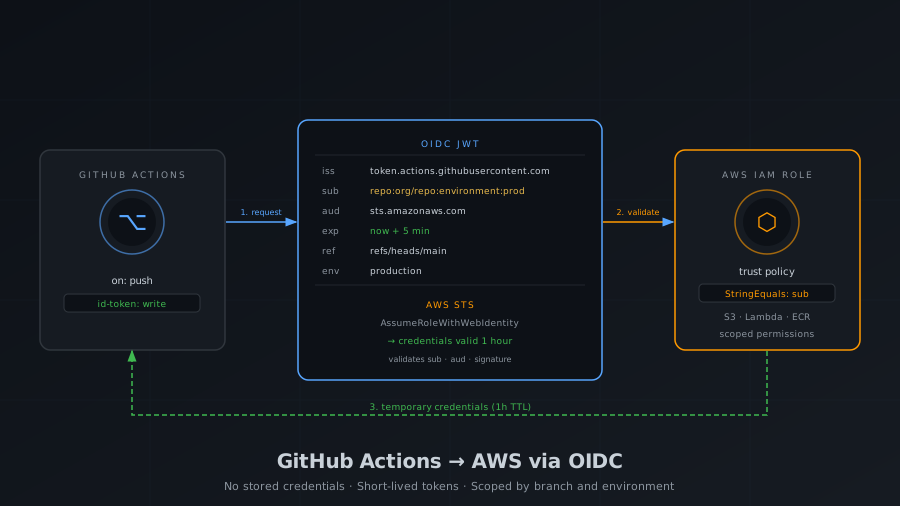
OIDC federation eliminates the credential entirely. GitHub issues a short-lived signed JWT for each workflow run. AWS STS validates that JWT against a trust policy you control, checks that the claims match - which repository, which branch, which environment - and returns temporary credentials scoped to a specific IAM role. The credentials expire in one hour. There is nothing to rotate. There is no secret to leak. Every AWS CloudTrail event carries the full OIDC subject claim, so you know exactly what triggered it.
This post covers the full setup: the trust model, how to wire it up with the AWS CLI, how to restrict access by branch and environment, multi-environment role design, and the compliance advantages you get without extra effort.
How the trust works
When a GitHub Actions workflow runs with id-token: write permission, GitHub mints a JWT from its OIDC endpoint. That token contains claims describing exactly what triggered the run:
| Claim | Example value | What it describes |
|---|---|---|
iss |
https://token.actions.githubusercontent.com |
The issuer - GitHub’s OIDC server |
sub |
repo:org/repo:ref:refs/heads/main |
Repository and trigger context |
aud |
sts.amazonaws.com |
Intended audience |
exp |
now + 5min |
Token lifetime - very short on purpose |
repository |
org/repo |
Repository full name |
ref |
refs/heads/main |
Git ref that triggered the run |
environment |
production |
GitHub Environment, if configured |
The workflow then calls aws-actions/configure-aws-credentials with a role ARN. That action presents the JWT to AWS STS via AssumeRoleWithWebIdentity. STS validates the JWT signature (against GitHub’s published JWKS), checks the aud claim equals sts.amazonaws.com, and evaluates your IAM role’s trust policy conditions against the sub and other claims. If everything matches, STS returns temporary credentials. If anything fails - wrong repository, wrong branch, wrong environment - the call is rejected before any AWS action can occur.
Setting up the OIDC provider in AWS
Before any role can trust GitHub tokens, AWS needs to know about GitHub’s OIDC endpoint. You register it once per account as an IAM Identity Provider:
aws iam create-open-id-connect-provider \
  --url https://token.actions.githubusercontent.com \
  --client-id-list sts.amazonaws.com \
  --thumbprint-list 6938fd4d98bab03faadb97b34396831e3780aea1
This is an account-level resource. One provider covers all roles in the account. If you manage multiple accounts (staging, production), run this once in each.
The client-id-list value sts.amazonaws.com must match the aud claim GitHub puts in the token when the workflow uses aws-actions/configure-aws-credentials. This is a fixed agreement between the action and AWS - do not change it.
The IAM role and trust policy
Every environment that GitHub deploys to gets its own IAM role. The trust policy is where you express who is allowed to assume it. Save this as trust-policy.json:
{
  "Version": "2012-10-17",
  "Statement": [
    {
      "Effect": "Allow",
      "Principal": {
        "Federated": "arn:aws:iam::123456789012:oidc-provider/token.actions.githubusercontent.com"
      },
      "Action": "sts:AssumeRoleWithWebIdentity",
      "Condition": {
        "StringEquals": {
          "token.actions.githubusercontent.com:aud": "sts.amazonaws.com",
          "token.actions.githubusercontent.com:sub": "repo:your-org/your-repo:ref:refs/heads/main"
        }
      }
    }
  ]
}
aws iam create-role \
  --role-name github-prod-deploy \
  --assume-role-policy-document file://trust-policy.json
Two conditions, both must pass:
audmust equalsts.amazonaws.com- prevents tokens minted for other services from being used here.submust match your pattern - scopes the role to a specific repository and trigger context.
Attaching permissions to the role
The trust policy controls who can assume the role. A separate permissions policy controls what they can do once they have. Without it the role can be assumed but every AWS call will be denied.
Save this as deploy-policy.json, scoped to exactly what your pipeline needs:
{
  "Version": "2012-10-17",
  "Statement": [
    {
      "Effect": "Allow",
      "Action": ["s3:PutObject", "s3:DeleteObject", "s3:GetObject", "s3:ListBucket"],
      "Resource": [
        "arn:aws:s3:::my-prod-bucket",
        "arn:aws:s3:::my-prod-bucket/*"
      ]
    },
    {
      "Effect": "Allow",
      "Action": [
        "lambda:UpdateFunctionCode",
        "lambda:PublishVersion",
        "lambda:UpdateAlias",
        "lambda:GetFunction",
        "lambda:WaitForFunctionActive"
      ],
      "Resource": "arn:aws:lambda:eu-west-1:123456789012:function:my-function"
    },
    {
      "Effect": "Allow",
      "Action": "cloudfront:CreateInvalidation",
      "Resource": "arn:aws:cloudfront::123456789012:distribution/ABCDEF123456"
    }
  ]
}
aws iam put-role-policy \
  --role-name github-prod-deploy \
  --policy-name deploy \
  --policy-document file://deploy-policy.json
Restricting by branch, tag, and environment
The sub claim is the primary restriction surface. Its format depends on what triggered the workflow:
| Trigger | Subject claim |
|---|---|
Push to branch main |
repo:org/repo:ref:refs/heads/main |
| Push to any branch | repo:org/repo:ref:refs/heads/* |
Tag matching v* |
repo:org/repo:ref:refs/tags/v* |
GitHub Environment production |
repo:org/repo:environment:production |
| Pull request | repo:org/repo:pull_request |
workflow_dispatch |
repo:org/repo:workflow_dispatch |
A role that deploys to production should use the environment form, not the branch form. The difference matters: anyone can push to main if branch protection is misconfigured. A GitHub Environment with required reviewers cannot be bypassed without a human approval. The sub claim will contain environment:production only after that gate is cleared.
For a role used by pull requests to run a plan or generate deployment diffs, the pull_request subject restricts it to read operations triggered from PRs - no direct pushes can assume it.
Wildcards in sub conditions
When you need a role accessible from any branch in a repository (e.g., a shared CI role that only reads from S3), use StringLike with a wildcard:
"StringLike": {
  "token.actions.githubusercontent.com:sub": "repo:your-org/your-repo:*"
}
Be deliberate about wildcards. repo:your-org/*:* would allow any repository in your org to assume the role - useful for a shared read-only role, dangerous for a deploy role.
Multi-environment role design
The right model is one role per environment per function, each with the minimum permissions it needs.
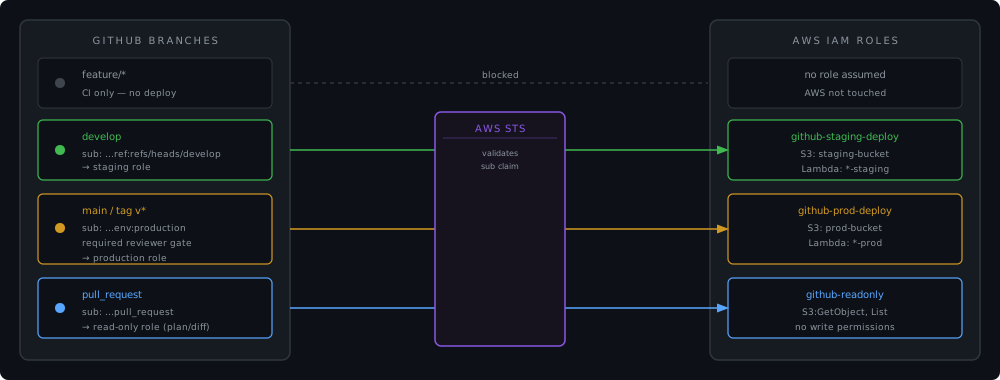
The trust policy structure is the same as the one in the previous section - only the sub condition changes per role. For staging, scoped to the develop branch:
# trust-policy-staging.json - sub: "repo:your-org/your-repo:ref:refs/heads/develop"
aws iam create-role \
  --role-name github-staging-deploy \
  --assume-role-policy-document file://trust-policy-staging.json
For production, scoped to the GitHub Environment instead of a branch:
# trust-policy-prod.json - sub: "repo:your-org/your-repo:environment:production"
aws iam create-role \
  --role-name github-prod-deploy \
  --assume-role-policy-document file://trust-policy-prod.json
The workflow side
Here is what the GitHub Actions side looks like, based on the Streamline project:
jobs:
  prepare:
    runs-on: ubuntu-latest
    permissions:
      contents: read          # no id-token here - this job doesn't touch AWS

  deploy-frontend:
    needs: prepare
    runs-on: ubuntu-latest
    environment: production   # triggers the GitHub Environment gate
    permissions:
      id-token: write         # required to request the OIDC token
      contents: read
    steps:
      - uses: actions/checkout@v4

      - uses: aws-actions/configure-aws-credentials@v4
        with:
          role-to-assume: $
          aws-region: $

      - name: Deploy
        run: |
          aws s3 sync frontend/ s3://$ \
            --cache-control "public, max-age=31536000, immutable"
Three things to notice:
id-token: write is job-scoped. The prepare job reads the repository and detects what changed - it never touches AWS, so it doesn’t request the OIDC permission. Only the jobs that call configure-aws-credentials need id-token: write. At the workflow level the default permission is id-token: none, which is correct.
environment: production is where the approval gate lives. Set this on the job, not the workflow. GitHub will pause the job and require the designated reviewers to approve before the OIDC token is issued. The sub claim will contain environment:production only after approval - matching your IAM trust policy condition.
role-to-assume accepts an ARN, not a key pair. There is no aws-access-key-id or aws-secret-access-key. The action handles the full OIDC exchange internally and exports the standard AWS_* environment variables for subsequent steps.
Compliance and audit advantages
No credential to rotate, leak, or audit
Long-lived IAM credentials require rotation policies, leak detection (AWS regularly scans public repos and revokes exposed keys), access key age alarms in Security Hub, and periodic audits of who has credentials and whether they are still needed. OIDC eliminates all of this for CI/CD. The credential surface shrinks to the GitHub-issued token, which expires in minutes and cannot be reused outside the context it was issued for.
CloudTrail records the full identity chain
Every AssumeRoleWithWebIdentity call creates a CloudTrail event. That event includes:
- The role ARN that was assumed
- The OIDC subject claim:
repo:your-org/your-repo:environment:production - The OIDC issuer
- The source IP of the GitHub runner
- The resulting session ARN
Every subsequent AWS API call in that session carries the session ARN. You can trace any S3 put, Lambda invocation, or CloudFront invalidation back to the exact repository, branch, and workflow run that triggered it.
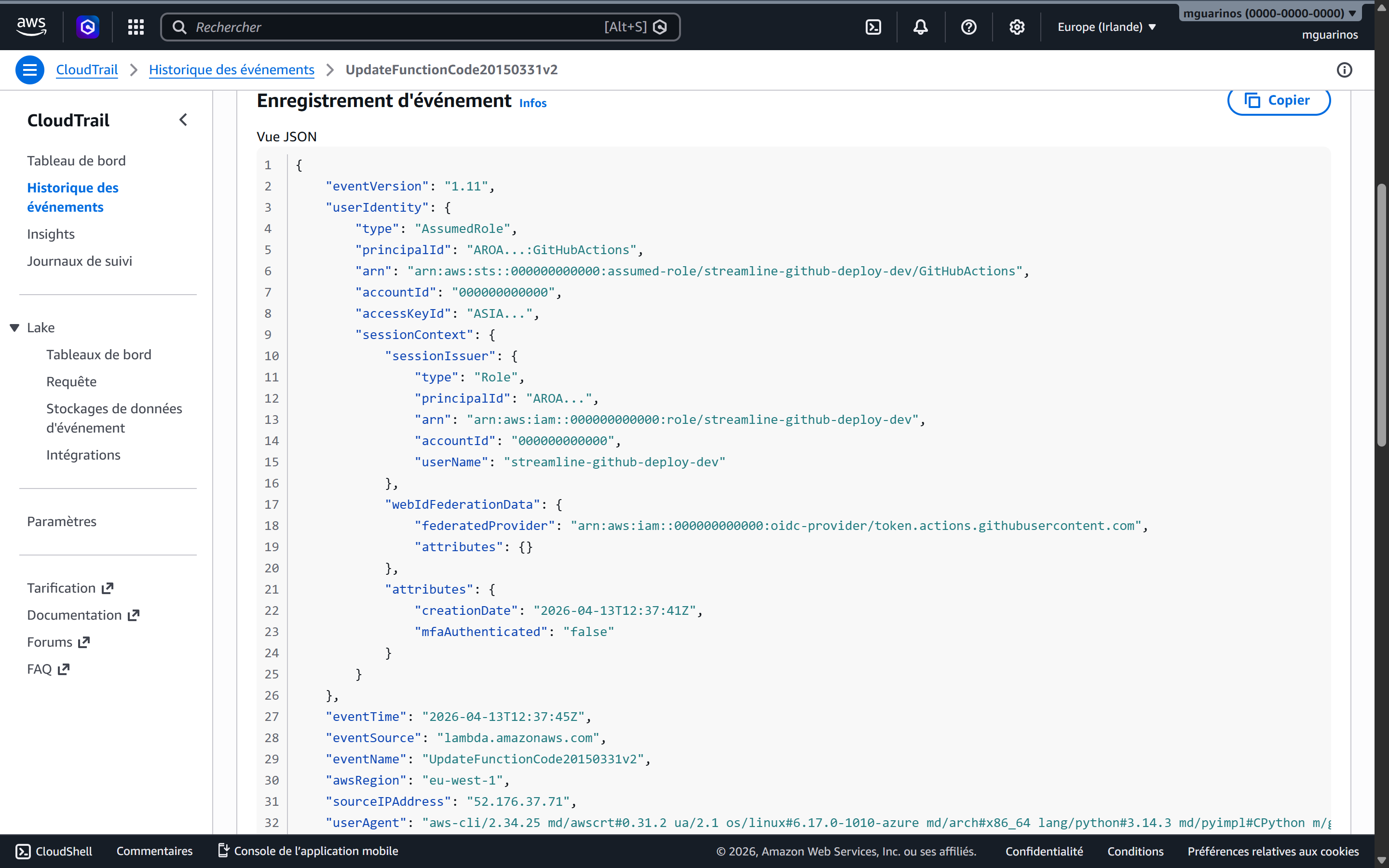
ASIA - the STS temporary credential prefix, not a long-lived AKIA key. The username is the IAM role session name set by the workflow, and the source IP belongs to a GitHub-hosted runner.SOC 2 and ISO 27001 alignment
Both frameworks require demonstrable least-privilege access and evidence that access is scoped to need. The trust policy sub condition is machine-readable proof that production credentials can only be issued to workflows running against a specific environment after human approval. The IAM role configuration and the GitHub Environment settings together constitute an auditable, version-controlled access control - auditors can inspect both without relying on convention or documentation.
The absence of stored credentials also satisfies key management controls: there is no AWS credential in your secret store, so there is nothing to rotate, nothing that can be extracted from a compromised runner cache, and no access key age to report.
What you might miss
The aud condition is not optional. Without it, any JWT issued by token.actions.githubusercontent.com - from any organisation or repository on GitHub - could attempt to assume your role. The sub condition alone does not protect you if someone else’s repository happens to have a matching subject pattern.
StringLike vs StringEquals for wildcards. Use StringEquals for exact matches - it’s faster and leaves no room for misinterpretation. Use StringLike only when you need * or ?. Do not use StringLike with an exact value; it works but signals that the intent was something more permissive.
Branch protection and environment protection are separate layers. The OIDC trust policy restricts which context can assume a role. Branch protection rules prevent who can push to the branch in the first place. GitHub Environment required reviewers gate who can deploy. All three are independent - losing one does not compromise the others, but the strongest posture uses all three.
Session duration. The default session for AssumeRoleWithWebIdentity is one hour, which is the maximum unless the role’s MaxSessionDuration is extended. Deployments taking longer than an hour will fail mid-run with expired credentials. Set role-session-duration in the action or extend the role’s max session if needed.
IAM permission boundaries prevent privilege escalation. If a deployment role has iam:CreateRole or iam:AttachRolePolicy, it can in theory create a new role with more permissions than it has. A permission boundary applied to all roles created by the deploy role caps what those child roles can ever do.
Putting it together
The setup reduces to five things:
- An IAM OIDC provider - registered once per AWS account, pointing at
https://token.actions.githubusercontent.com. - One IAM role per environment per access level - each with a trust policy that
StringEqualsthesubclaim to the exact context allowed. - A scoped permissions policy on each role - listing only the specific resource ARNs the pipeline needs to touch.
- A GitHub Environment for each production-grade deployment target - with required reviewers and (optionally) a deployment wait timer.
permissions: id-token: writeon the specific jobs that callconfigure-aws-credentials, and only those jobs.
The resulting pipeline has no secrets to manage in GitHub, produces a full attribution chain in CloudTrail, and can only deploy to production after a human explicitly approves it through a gated GitHub Environment - all without any changes to how the actual deployment steps work.